Task estimation and approval chain
How SmartERP enforces engineering estimation rigor through a multi-tier review chain connecting Developers, Team Leaders, Technical Leads, and Project Managers.
Accurate effort estimation is critical for cost baseline integrity and sprint predictability. SmartERP Project Estimation Approval (smarterp_project_approval) introduces a structured four-stage governance workflow that ensures technical sanity and management sign-off before effort is committed to task budgets.
The four-tier approval workflow#
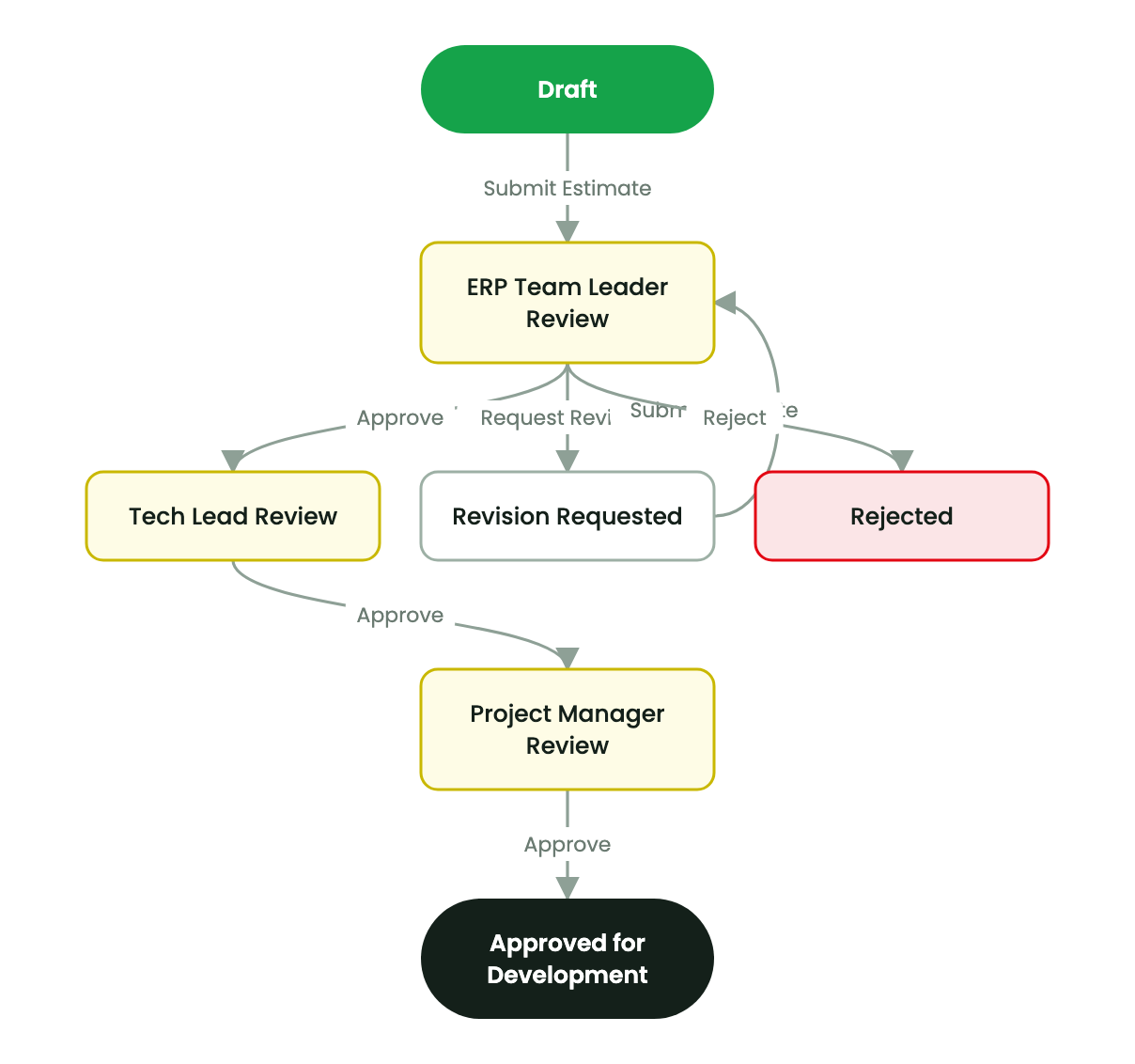
When estimation governance is active on a project, effort hours move through distinct review stages:
| Stage | Responsible role | Evaluation focus | Next valid actions |
|---|---|---|---|
Draft (draft) | Developer / Assignee | Breaks down requirements and inputs initial estimated hours and breakdown rationale. | Submit Estimate |
Team Leader Review (tl_review) | ERP Team Leader | Verifies workload balance, functional accuracy, and adherence to delivery patterns. | Approve, Request Revision, Reject |
Tech Lead Review (tech_review) | Technical Lead / Architect | Evaluates architectural complexity, technical risks, and non-functional requirements. | Approve, Request Revision, Reject |
PM Review (pm_review) | Project Manager | Validates budget alignment, client milestones, and resource capacity constraints. | Approve, Request Revision, Reject |
Approved (approved) | System (Automated) | Locks estimated hours and automatically copies approved hours into allocated_hours. | Task ready for sprint inclusion |
Submitting and reviewing an estimate#
- The developer opens the task, navigates to the Estimation tab, and inputs:
- Initial Estimate (Hours): Expected effort.
- Estimation Rationale: Breakdown of effort across backend, frontend, unit testing, and documentation.
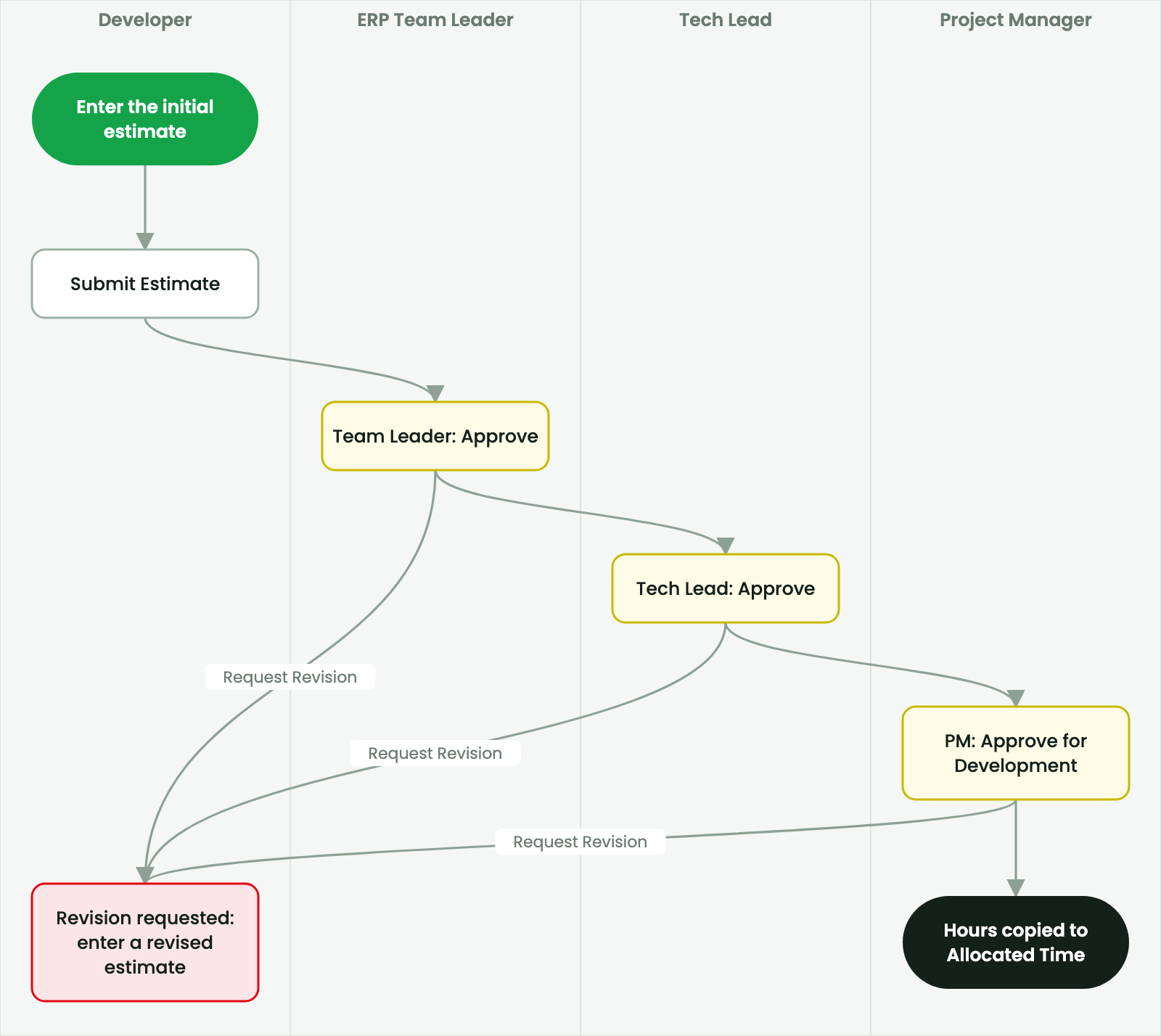
- The developer clicks Submit Estimate. The task state transitions to
tl_review, and an approval notification is routed to the designated Team Leader's approval queue. - Reviewers evaluate the task from their My Approvals menu:
- Clicking Approve advances the estimate to the next sequential tier.
- Clicking Request Revision prompts for feedback notes and returns the task to the developer in the
revisionstate. The developer updates the hours and resubmits. - Clicking Reject terminates the estimate. Rejected tasks cannot proceed to development without a new task or PM re-evaluation.
Synchronization with Allocated Time#
When the Project Manager completes the final approval:
- SmartERP automatically updates the native Odoo field Allocated Time (
allocated_hours) with the approved estimate. - The approval timestamp and authorized PM user are indelibly stamped in the task record.
- In Agile projects, this approved estimate satisfies the Definition of Ready estimation requirement for sprint inclusion.
Note
Subsequent changes to the scope of an approved task require resetting the estimate through a formal Change Request or PM re-approval to maintain historical baseline integrity.