Configure In-Process Quality Control Points (QCP)
Setting up mandatory quality gates, measurement tolerances, pass/fail checks, and sampling frequencies.
1. Overview & Business Value#
This comprehensive operational guide details the architecture, business workflows, configuration parameters, and execution steps for Configure In-Process Quality Control Points (QCP) within SmartERP.
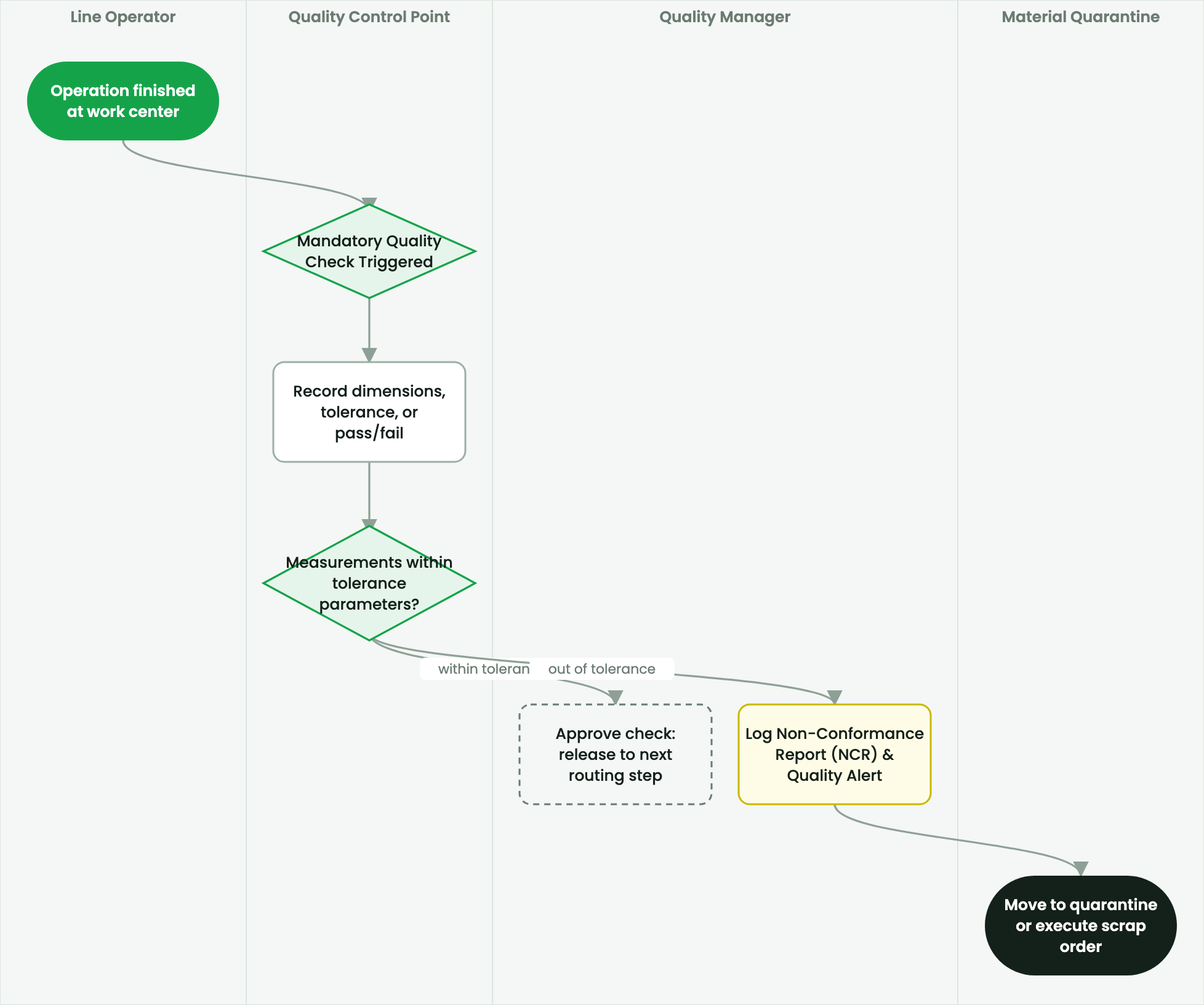
Setting up mandatory quality gates, measurement tolerances, pass/fail checks, and sampling frequencies.
2. Prerequisites & Security Access Groups#
- Required Modules:
mrp, quality_control, smarterp_manufacturing_costing - Security Groups:
Manufacturing User(Technical ID:mrp.group_mrp_user)Manufacturing Administrator(Technical ID:mrp.group_mrp_manager)Quality Inspector(Technical ID:quality.group_quality_user)
- Master Data Dependencies: Bills of Materials (BoM), routing operations, work centers with machine/labor hourly rates, raw material stock, and inspection checkpoints.
3. Step-by-Step Configuration & Execution#
Step 1: Navigating to the Interface#
- Log into your SmartERP instance at
https://smarterp.et/odoo. - Open the main App Switcher (grid icon in the top-left corner).
- Navigate to Quality → Quality Control → Control Points.
Step 2: Operational Data Parameters & Controls#
Ensure all mandatory parameters comply with enterprise operational standards:
- Authorized Operator: Action executed under assigned RBAC permissions (Quality Assurance Manager, QC Inspector).
- Relational Integrity: Linked to upstream customer, product, inventory lot, or manufacturing order.
- Statutory & Quality Controls: Verified against Ethiopian commercial and tax regulations or technical engineering specifications.
Step 3: Operational Execution & State Progression#
- State Progression Gate: Advance record from Draft through Confirmed to Completed / Posted.
- Integrated System Impact: Automatically updates inventory stock quants, customer receivables, or work-in-progress cost accounting ledgers.
- Audit Verification: System registers tamper-evident audit records logging user ID, timestamp, and cryptographic transaction digests.
Quality Assurance Gates#
SmartERP Quality Control Points (quality.point) enforce inspection standards at critical production stages:
- Incoming Material Gate: Validating raw material purity or hardness before storage.
- In-Process Gate: Validating dimensions, weight, or moisture content during routing operations.
- Final Product Gate: Full cosmetic, functional, and packaging audit before finished goods stock receipt.
Procedure: Creating a Quality Control Point#
- Navigate to Quality > Quality Control > Control Points and click New.
- Title:
Tensile Strength & Wall Thickness Check. - Product / Product Category: Select the applicable finished good or BoM.
- Operations: Select
Manufacturing. - Work Order Operation: Select
Welding & Sizing. - Type of Check:
- Pass / Fail: Simple visual defect check.
- Measure: Numeric entry with minimum and maximum tolerance limits (e.g., Norm
2.50 mm, Min2.42 mm, Max2.58 mm). - Take a Picture: Operator captures photographic evidence of packaging.
- Control Frequency:
All Products(100% inspection).Randomly(e.g., inspect 1 out of every 20 units).Periodically(e.g., once every 2 hours).
- Click Save. When an operator executes this work order, SmartERP locks operation closure until the quality check is validated.
4. Advanced Configuration Points#
- Automated Actions & Scheduled Tasks (Crons):
MRP: Recalculate BoM standard costs(mrp.ir_cron_bom_cost_roll): Runs weekly to update standard costing from latest procurement purchase pricesQuality: Trigger periodic inspection alerts(quality.ir_cron_inspection_check): Runs daily to flag mandatory quality testing queuesWorkcenter: Update OEE statistics(mrp.ir_cron_workcenter_oee): Runs hourly to compute Overall Equipment Effectiveness metrics
- Custom Print Templates & Reports:
- Production Order Traveler & Pick List
- Shop Floor Work Order Execution Slip
- Quality Inspection Certificate & Non-Conformance Report
- Manufacturing Cost Analysis & Variance Ledger
- Multi-Company Rules: Record-level security isolation under Company 1 (
Ashewa Technology Solutions S.C.), preventing cross-company ledger leakage across parent and subsidiary legal entities.
5. Comprehensive Troubleshooting Matrix#
| Error Symptom / Exception | Probable Root Cause | Corrective Action / Resolution |
|---|---|---|
BoM Missing Error: No active Bill of Materials found | Product variant lacks a verified and confirmed BoM in the system. | Create and confirm an active BoM under Manufacturing → Products → Bills of Materials. |
Component Shortage Block: Insufficient stock | Raw material components have not been transferred to the shop floor location. | Execute an internal transfer from main warehouse to production staging location. |
Quality Gate Blocked: Mandatory test failed | Work order failed critical quality tolerance threshold. | Perform required corrective rework or request authorized Quality Manager override. |
Workcenter Capacity Overload | Scheduled production duration exceeds available work center shift capacity. | Adjust scheduled start dates or distribute load across alternative work centers. |
Last updated: 2026-11-15