Share Capital Subscription & Share Transfers
Configure nominal share values, track member share certificates, manage statutory capital reserves, and execute peer share transfers.
1. Overview & Business Value#
This comprehensive operational guide details the architecture, business workflows, configuration parameters, and execution steps for Share Capital Subscription & Share Transfers within SmartERP.
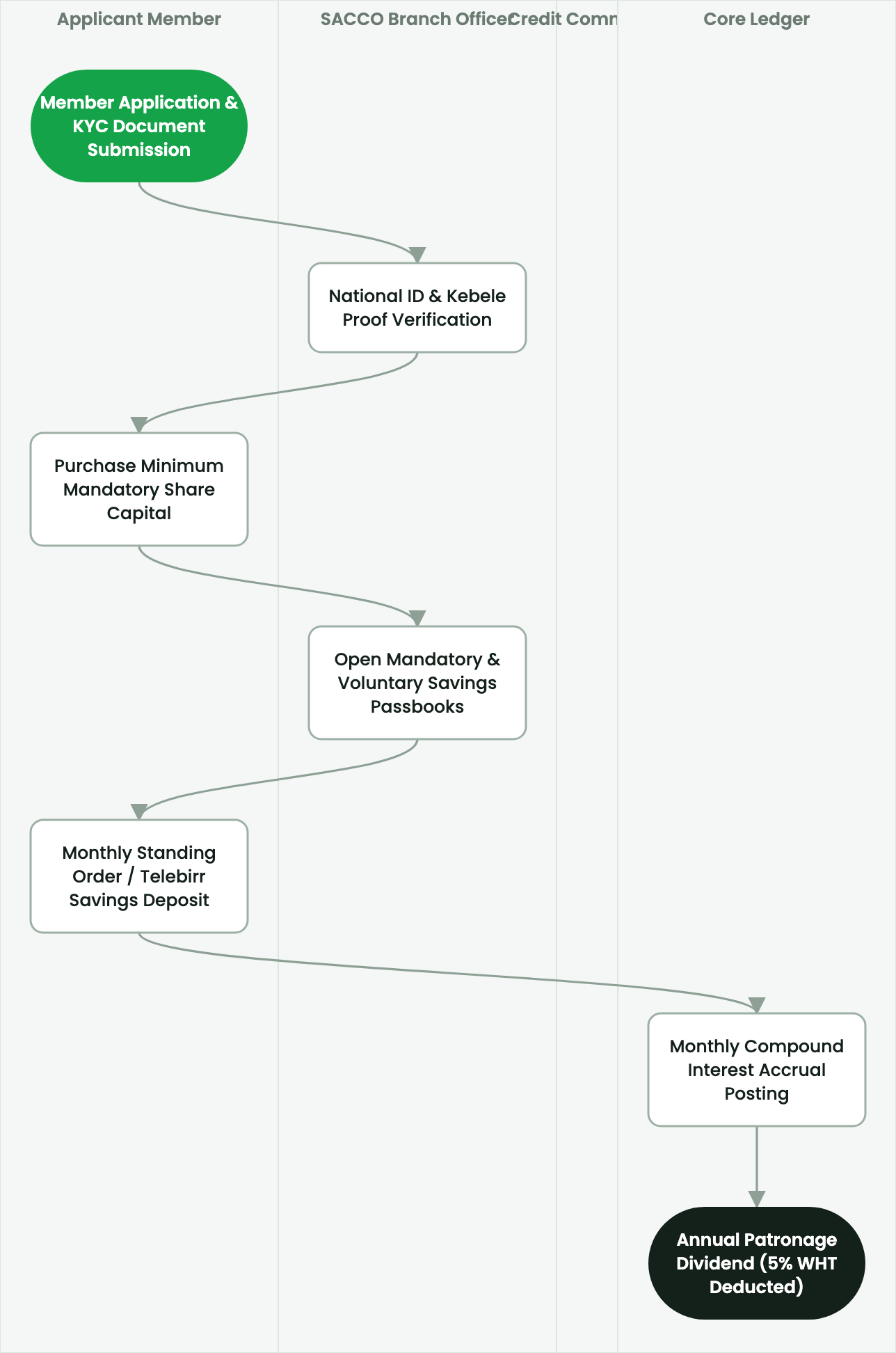
Configure nominal share values, track member share certificates, manage statutory capital reserves, and execute peer share transfers.
2. Prerequisites & Security Access Groups#
- Required Modules:
smarterp_sacco_core, smarterp_equb, smarterp_loan_management - Security Groups:
SACCO Loan Officer(Technical ID:smarterp_sacco.group_sacco_officer)SACCO Credit Committee Member(Technical ID:smarterp_sacco.group_sacco_committee)SACCO General Manager(Technical ID:smarterp_sacco.group_sacco_manager)
- Master Data Dependencies: Member KYC profiles, share capital registers, savings product tiers, loan products with reducing-balance schedules, and Equb rotational pool configurations.
3. Step-by-Step Configuration & Execution#
Step 1: Navigating to the Interface#
- Log into your SmartERP instance at
https://smarterp.et/odoo. - Open the main App Switcher (grid icon in the top-left corner).
- Navigate to SACCO Core → Member Accounts; Loans → Active Loans.
Step 2: Operational Data Parameters & Controls#
Ensure all mandatory parameters comply with enterprise operational standards:
- Authorized Operator: Action executed under assigned RBAC permissions (SACCO General Manager, Loan Appraisal Officer, Cashier).
- Relational Integrity: Linked to upstream master records, approval requests, or transactional ledgers.
- Statutory & Quality Controls: Verified against Ethiopian statutory regulations and corporate governance standards.
Step 3: Operational Execution & State Progression#
- State Progression Gate: Advance record from Draft through Audited to Confirmed / Certified.
- Integrated System Impact: Automatically updates real-time operational states and posts financial/inventory journal moves.
- Audit Verification: System registers tamper-evident audit records logging user ID, timestamp, and cryptographic transaction digests.
Share Capital Structure & Nominal Value#
Member share capital forms the core equity base of the cooperative. Unlike commercial banks, member voting power remains strictly democratic: one member holds one vote regardless of whether they own 10 shares or 500 shares.
To configure share capital parameters:
- Open SACCO > Configuration > Core Parameters > Share Products.
- Define nominal share values:
- Par Value per Share: e.g.,
100.00 ETB(or500.00 ETBin large unions). - Minimum Mandatory Shares: e.g.,
10 Shares (1,000.00 ETB)required to attain full voting rights. - Maximum Shareholding Cap: Under ECC regulations, no individual member may hold more than 10% of total cooperative share capital, preventing individual financial dominance.
- Par Value per Share: e.g.,
Issuing Share Certificates#
- Open the member record and click Purchase Shares.
- Enter the number of shares subscribed (e.g.,
50 Shares). - Select payment method: Cash Counter, Bank Deposit, or Deduction from Voluntary Savings.
- Click Issue Share Certificate:
- The system generates a serialized, cryptographically verifiable Share Certificate:
- Certificate Number:
CERT-2026-0891. - Distinctive Share Numbers:
Share No. 4501 to Share No. 4550. - Nominal Total Value:
5,000.00 ETB.
- Certificate Number:
- The general ledger immediately posts:
- Debit: Cash / Bank (
101100) - Credit: Member Share Capital Equity (
301000)
- Debit: Cash / Bank (
- The system generates a serialized, cryptographically verifiable Share Certificate:
Executing Peer-to-Peer Share Transfers#
When an exiting member transfers shares to an eligible active member:
- Navigate to SACCO > Shares > Share Transfers and click New.
- Select Transferor (Seller) and Transferee (Buyer).
- Enter certificate numbers and quantity of shares transferred.
- Verify Board of Directors approval minute reference.
- Click Execute Share Transfer:
- The system retires the original share certificate and issues a new certificate to the recipient, recording the historical transfer in the cooperative share register.
4. Advanced Configuration Points#
- Automated Actions & Scheduled Tasks (Crons):
SACCO: Accrue monthly member savings interest(smarterp_sacco.ir_cron_savings_interest): Runs on the final day of each calendar month to credit interestLoan: Evaluate 5-tier NBE delinquency classification(smarterp_sacco.ir_cron_loan_delinquency): Runs nightly to compute loan loss provisions per NBE directivesEqub: Execute scheduled lottery draw(smarterp_sacco.ir_cron_equb_draw): Runs on defined pool cycle dates using provably fair random selection
- Custom Print Templates & Reports:
- Member Savings Passbook & Transaction Ledger
- Loan Amortization Schedule (Reducing Balance)
- NBE 5-Tier Delinquency & Loan Loss Provisioning Statement
- Annual Patronage Dividend Distribution Schedule
- Multi-Company Rules: Record-level security isolation under Company 1 (
Ashewa Technology Solutions S.C.), preventing cross-company ledger leakage across parent and subsidiary legal entities.
5. Comprehensive Troubleshooting Matrix#
| Error Symptom / Exception | Probable Root Cause | Corrective Action / Resolution |
|---|---|---|
Loan Blocked: Exceeds 3x savings ceiling | Requested loan principal exceeds 300% of member unencumbered savings balance. | Increase compulsory savings deposit or provide authorized co-signers with sufficient collateral. |
Equb Draw Blocked: Participant arrears detected | Selected Equb member has unpaid rotational dues in current or prior cycles. | Collect outstanding contribution payment before executing lottery draw. |
Share Capital Limit Error: Member exceeds 10% ceiling | Subscribed shares exceed statutory maximum under Proclamation No. 985/2016. | Restrict share allocation to maximum allowable 10% total cooperative equity threshold. |