ይህ ገጽ ገና ወደ አማርኛ አልተተረጎመም። የእንግሊዝኛው ጽሑፍ ቀርቧል።
Higher Education Troubleshooting & Academic FAQ
Troubleshooting solutions for registration blocks, timetable collisions, grade calculation anomalies, and portal access issues.
1. Overview & Business Value#
This comprehensive operational guide details the architecture, business workflows, configuration parameters, and execution steps for Higher Education Troubleshooting & Academic FAQ within SmartERP.
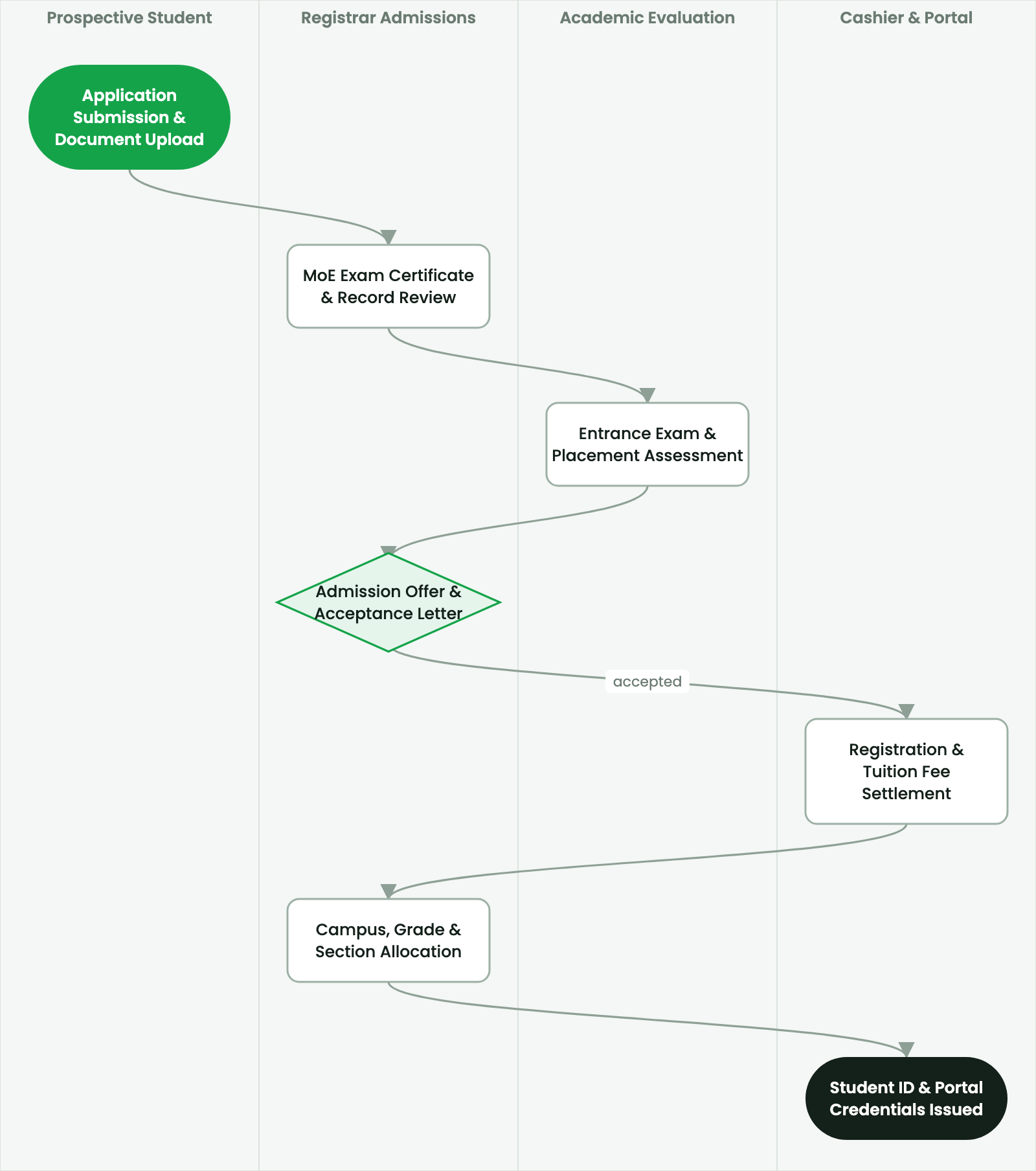
Troubleshooting solutions for registration blocks, timetable collisions, grade calculation anomalies, and portal access issues.
2. Prerequisites & Security Access Groups#
- Required Modules:
smarterp_higher_education, smarterp_student_records - Security Groups:
Admissions Officer(Technical ID:smarterp_higher_ed.group_admissions_user)Registrar / Academic Dean(Technical ID:smarterp_higher_ed.group_registrar_manager)Faculty Member / Instructor(Technical ID:smarterp_higher_ed.group_faculty_user)
- Master Data Dependencies: Faculties, departments, ECTS modular curricula, academic semesters (Ethiopian/Gregorian calendar), tuition fee schedules, and student master files.
3. Step-by-Step Configuration & Execution#
Step 1: Navigating to the Interface#
- Log into your SmartERP instance at
https://smarterp.et/odoo. - Open the main App Switcher (grid icon in the top-left corner).
- Navigate to Academic → Students → Admissions.
Step 2: Operational Data Parameters & Controls#
Ensure all mandatory parameters comply with enterprise operational standards:
- Authorized Operator: Action executed under assigned RBAC permissions (Academic Registrar, Faculty Dean, Student Affairs Officer).
- Relational Integrity: Linked to upstream master records, approval requests, or transactional ledgers.
- Statutory & Quality Controls: Verified against Ethiopian statutory regulations and corporate governance standards.
Step 3: Operational Execution & State Progression#
- State Progression Gate: Advance record from Draft through Audited to Confirmed / Certified.
- Integrated System Impact: Automatically updates real-time operational states and posts financial/inventory journal moves.
- Audit Verification: System registers tamper-evident audit records logging user ID, timestamp, and cryptographic transaction digests.
Frequently Encountered Academic Issues#
1. Student Blocked from Registering for Advanced Course#
- Symptoms: Portal displays error: "Registration Denied: Missing Prerequisite COSC-1012".
- Root Cause: The student did not earn a passing grade in the prerequisite course, or the transfer credit from another institution was not formally mapped in the student master file.
- Resolution:
- Open the student's academic history tab.
- If the student completed the prerequisite at an accredited transfer university, record a formal Credit Transfer Exemption in Higher Education > Registration > Credit Transfer.
- If the course was failed, the student must re-register for the prerequisite course before advancing.
2. CGPA Displays Incorrect Value After Course Repeat#
- Symptoms: A student repeated a failed course (
Freplaced withA), but the CGPA still reflects the previous failing score. - Root Cause: The repeat flag was not toggled on the new registration line, causing the GPA engine to calculate both attempts in the denominator.
- Resolution:
- Navigate to Higher Education > Assessment > Grade Corrections.
- Select the repeated registration record and verify the Is Course Repeat checkbox is active.
- Click Recalculate Cumulative CGPA. The system purges the previous grade points from the cumulative denominator and updates the official transcript.
3. Student Admit Card Blocked Due to "Tuition Hold" Despite Payment#
- Symptoms: The student settled fees via bank transfer, but the portal still displays "Admit Card Barred: Outstanding Balance".
- Root Cause: The digital bank webhook was delayed, or the payment was posted to general ledger without being reconciled against the specific student tuition invoice.
- Resolution:
- In Higher Education > Finance > Invoices, locate the student's pending invoice.
- Open the payments tab and match the bank transaction reference number.
- Click Reconcile Payment.
- Once the invoice transitions to
Paid, the admit card download unlocks immediately on the student portal.
4. Advanced Configuration Points#
- Automated Actions & Scheduled Tasks (Crons):
Education: Compute semester GPA and cumulative CGPA(smarterp_higher_ed.ir_cron_cgpa_calc): Runs at the end of each examination period to compute student academic standingFinance: Generate semester tuition fee invoices(smarterp_higher_ed.ir_cron_tuition_invoices): Runs prior to semester registration deadline
- Custom Print Templates & Reports:
- Official Student Academic Transcript (MoE & ETA Standards)
- Semester Course Registration & Clearance Slip
- Student ID Card with Cryptographic QR Verification
- Examination Results & Faculty Grade Distribution Ledger
- Multi-Company Rules: Record-level security isolation under Company 1 (
Ashewa Technology Solutions S.C.), preventing cross-company ledger leakage across parent and subsidiary legal entities.
5. Comprehensive Troubleshooting Matrix#
| Error Symptom / Exception | Probable Root Cause | Corrective Action / Resolution |
|---|---|---|
Prerequisite Blocked: Missing course prerequisite | Student has not successfully passed the prerequisite course code. | Register the student for prerequisite course or submit an academic dean prerequisite waiver. |
Grading Window Closed: Semester deadline passed | Faculty grade submission period has officially concluded. | Request temporary grade submission reopening from the Academic Registrar. |
Financial Hold: Outstanding tuition balance | Student examination entry or portal access blocked due to unpaid tuition invoice. | Process fee payment via Telebirr or record bank deposit voucher in the Finance office. |
መጨረሻ የተሻሻለው: 2026-11-15