ይህ ገጽ ገና ወደ አማርኛ አልተተረጎመም። የእንግሊዝኛው ጽሑፍ ቀርቧል።
Quick Start: 15-Minute Outpatient Encounter
Rapid step-by-step walkthrough of registering a patient, recording triage vitals, conducting a physician consultation, and dispensing medication.
1. Overview & Business Value#
This comprehensive operational guide details the architecture, business workflows, configuration parameters, and execution steps for Quick Start: 15-Minute Outpatient Encounter within SmartERP.
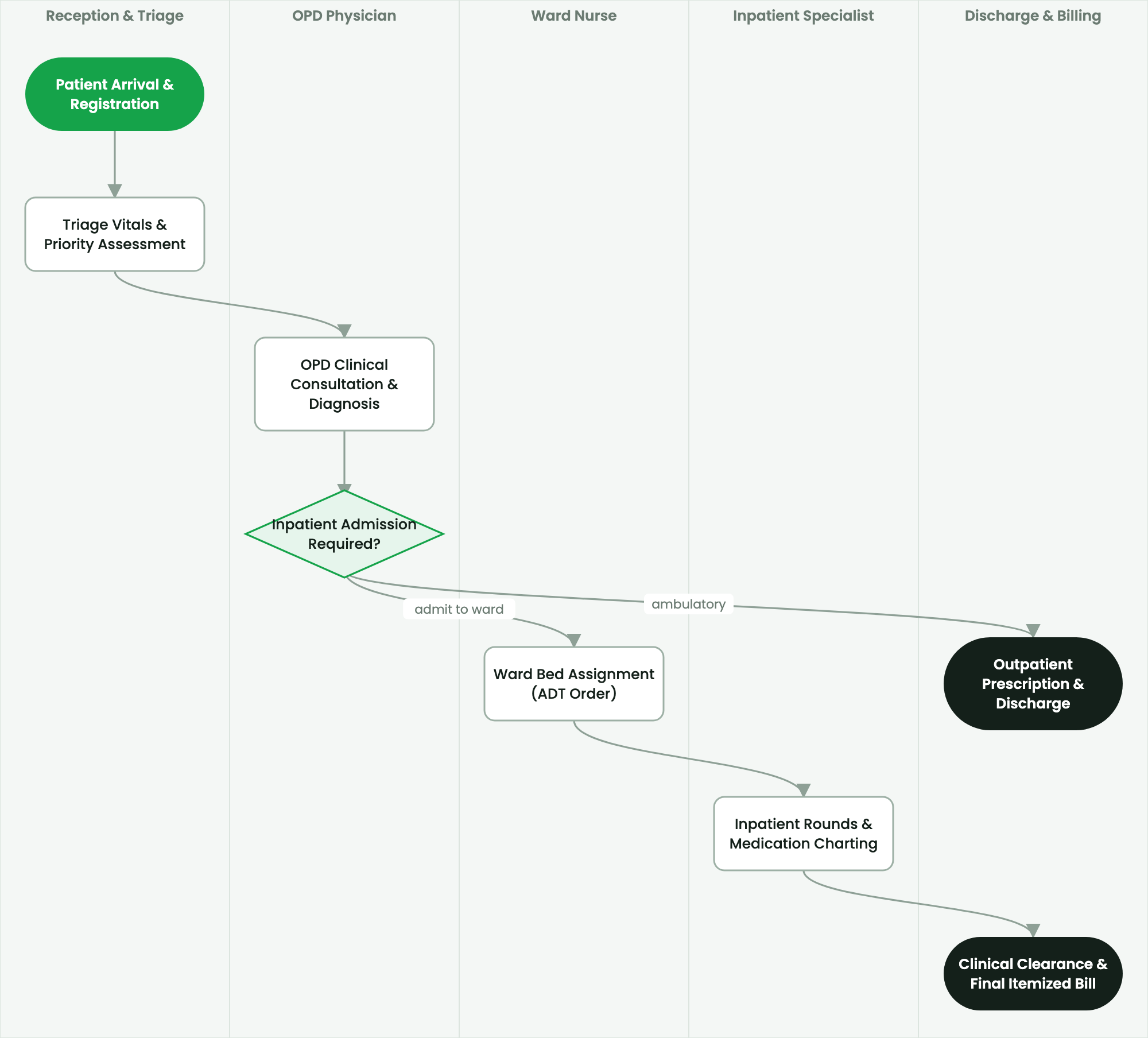
Rapid step-by-step walkthrough of registering a patient, recording triage vitals, conducting a physician consultation, and dispensing medication.
2. Prerequisites & Security Access Groups#
- Required Modules:
smarterp_healthcare, smarterp_clinical_core, smarterp_pharmacy - Security Groups:
Healthcare Receptionist(Technical ID:smarterp_healthcare.group_medical_receptionist)Physician / Attending Doctor(Technical ID:smarterp_healthcare.group_medical_doctor)Pharmacy Dispenser(Technical ID:smarterp_healthcare.group_medical_pharmacist)
- Master Data Dependencies: Patient master registry (Medical Record Number - MRN), EFDA drug formulary, Ethiopian Ministry of Health (MoH) HMIS disease codes, and EHIS insurance tariffs.
3. Step-by-Step Configuration & Execution#
Step 1: Navigating to the Module Interface#
- Log into your SmartERP instance at
https://smarterp.et/odoo. - Open the main App Switcher (grid icon in the top-left corner).
- Select the Healthcare app icon.
- From the top navigation bar, open Healthcare → Clinical Dashboard → OPD Triage / Inpatient ADT / EMR / Pharmacy Dispensing.
Step 2: Creating and Parameterizing Records#
- Click the New button in the top-left control panel.
- Complete the mandatory fields in the record form:
- Medical Record Number (MRN) (Mandatory): Unique national health identifier or generated hospital record code
- Patient Demographics (Mandatory): Full legal name, gender, date of birth, and Kebele residential location
- Encounter Type (Mandatory): Outpatient (OPD), Inpatient (IPD), Emergency, or Triage consultation
- Attending Physician (Mandatory): Licensed healthcare practitioner responsible for clinical encounter
- Configure optional operational parameters and localized tags as required:
- Insurance Provider & Policy (Optional): EHIS CBHI/SHI policy or corporate credit contract
- Triage Vital Signs (Optional): Blood pressure, pulse rate, respiratory rate, temperature, and SpO2
- ICD-11 / HMIS Diagnosis Code (Optional): Standardized diagnosis category for statutory health reporting
- Click the Save icon in the control bar to commit the record.
Step 3: Validating and Processing Transactions#
- State Transitions: Execute operational state progression (Reception / Triage → Consultation → Lab / Radiology → Prescription → Billing / Discharge).
- Ledger & System Impact: Patient billing registers medical service revenue, debits patient or insurance accounts receivable, and debits pharmaceutical inventory upon prescription dispensing.
- Audit Verification: Automated recording of author ID, timestamp, and immutable revision history.
Objective & Prerequisites#
This guide demonstrates a complete outpatient clinical cycle in under 15 minutes:
- Register a new patient and issue an MRN.
- Record triage vitals at the nursing station.
- Conduct a doctor consultation with an ICD-10 diagnosis.
- Issue an electronic laboratory order and review results.
- Dispense prescribed medication from the internal pharmacy.
Prerequisites: User credentials with permissions for Clinic Reception, Nursing, and Medical Officer roles.
Step 1: Register Patient at Reception (2 Minutes)#
- Navigate to Healthcare > Reception > Patients and click New.
- Enter personal demographics:
- Full Name:
Almaz Tesfaye Haile - Gender:
Female - Date of Birth:
1992-04-15(Age 34) - Region / Sub-City / Woreda / Kebele:
Addis Ababa / Bole / Woreda 03 / Kebele 07 - Phone:
+251 91 123 4567
- Full Name:
- Under Payment Category, select
Self-Pay / Cash. - Click Save. The system auto-generates the MRN:
CL-2026-001092. - Click Create Visit Encounter to assign the patient to the General Outpatient queue.
Step 2: Record Triage Vitals (3 Minutes)#
- Open Healthcare > Nursing > Triage Queue.
- Select
Almaz Tesfaye Haile(CL-2026-001092). - Enter physiological measurements:
- Systolic / Diastolic BP:
125 / 82 mmHg - Pulse Rate:
78 bpm - Respiratory Rate:
16 breaths/min - Temperature:
37.8 °C - Oxygen Saturation ($SpO_2$):
98% - Weight / Height:
62 kg / 165 cm(Auto-computed BMI:22.8 kg/m²)
- Systolic / Diastolic BP:
- Under Triage Category, assign
Green (Standard OPD). - Click Confirm & Send to Doctor Queue.
Step 3: Conduct Physician Consultation & Order Lab (5 Minutes)#
- Navigate to Healthcare > Consultation > Doctor Workspace.
- Select the patient from the assigned waiting queue and click Start Encounter.
- Under Chief Complaint, record: "Fever, headache, and generalized body aches for 3 days."
- In the Diagnostics tab, click Add Lab Request:
- Test Code:
LAB-BF-MAL(Blood Film for Malaria) - Priority:
Routine
- Test Code:
- Click Submit Lab Order. The order transmits immediately to the laboratory workstation.
Step 4: Laboratory Analysis & Result Validation (3 Minutes)#
- In Healthcare > Laboratory > Specimen Intake, scan the patient MRN.
- Click Collect Specimen and assign barcode
SPEC-88219. - Enter laboratory findings:
- Blood Film Examination:
Plasmodium vivax trophozoites observed (+2)
- Blood Film Examination:
- Click Validate by Lab Technologist. The result immediately updates on the doctor's consultation screen with an alert notification.
Step 5: Prescription & Pharmacy Dispensing (2 Minutes)#
- Return to the doctor's consultation screen. The verified malaria result is visible.
- In the Prescription tab, click Add Medication:
- Drug:
Chloroquine Phosphate 250mg Tablet - Dosage & Frequency:
4 tablets stat, then 2 tablets at 6, 24, and 48 hours - Duration:
3 days
- Drug:
- Add Primary Diagnosis:
B51.9 - Plasmodium vivax malaria without complication. - Click Sign & Close Encounter.
- Switch to Healthcare > Pharmacy > Dispense Queue.
- The pharmacist verifies the prescription, picks batch
CQ-2025-11-B(expiry 2027-08-31), prints dosage instructions in Amharic and English, and clicks Dispense & Bill. - The patient settles the payment of 185.00 ETB at the cashier, receiving an electronic fiscal receipt.
4. Advanced Configuration Points#
- Automated Actions & Scheduled Tasks (Crons):
Healthcare: Generate daily MoH HMIS aggregate tally(smarterp_healthcare.ir_cron_hmis_sync): Runs daily at 23:00 to prepare DHIS2 health data summariesPharmacy: Flag expiring EFDA medicine batches(smarterp_healthcare.ir_cron_fefo_expiry): Runs daily at 06:00 to alert dispensers of lots expiring within 60 days
- Custom Print Templates & Reports:
- Official Patient Encounter Summary & Medical Certificate
- Electronic Prescription Order Form (Model 19 Compliant)
- Ethiopian Health Insurance Service (EHIS) Claim Dossier
- Daily MoH Outpatient / Inpatient Morbidity Tally Sheet
- Multi-Company Rules: Record-level security isolation under Company 1 (
Ashewa Technology Solutions S.C.), preventing cross-company ledger leakage across parent and subsidiary legal entities.
5. Comprehensive Troubleshooting Matrix#
| Error Symptom / Exception | Probable Root Cause | Corrective Action / Resolution |
|---|---|---|
Access Block: Confidential clinical diagnosis restricted | User is not listed as the patient's attending physician or authorized consultant. | Request explicit clinical consultation delegation from the department head. |
Credit Ceiling Block: Corporate insurance expired | Patient corporate insurance policy limit exceeded or expired. | Switch billing mode to private cash settlement or upload pre-authorization approval from the insurer. |
FEFO Allocation Error: Expired medicine batch blocked | Dispenser selected medicine lot past statutory EFDA expiry date. | Isolate expired lot to quarantine storage and dispense compliant active lot. |
መጨረሻ የተሻሻለው: 2026-11-15