Outpatient Consultations & Electronic Medical Records (EMR)
Clinical guide for physicians to document outpatient encounters using structured SOAP notes, ICD-10 diagnostic coding, and electronic orders.
1. Overview & Business Value#
This comprehensive operational guide details the architecture, business workflows, configuration parameters, and execution steps for Outpatient Consultations & Electronic Medical Records (EMR) within SmartERP.
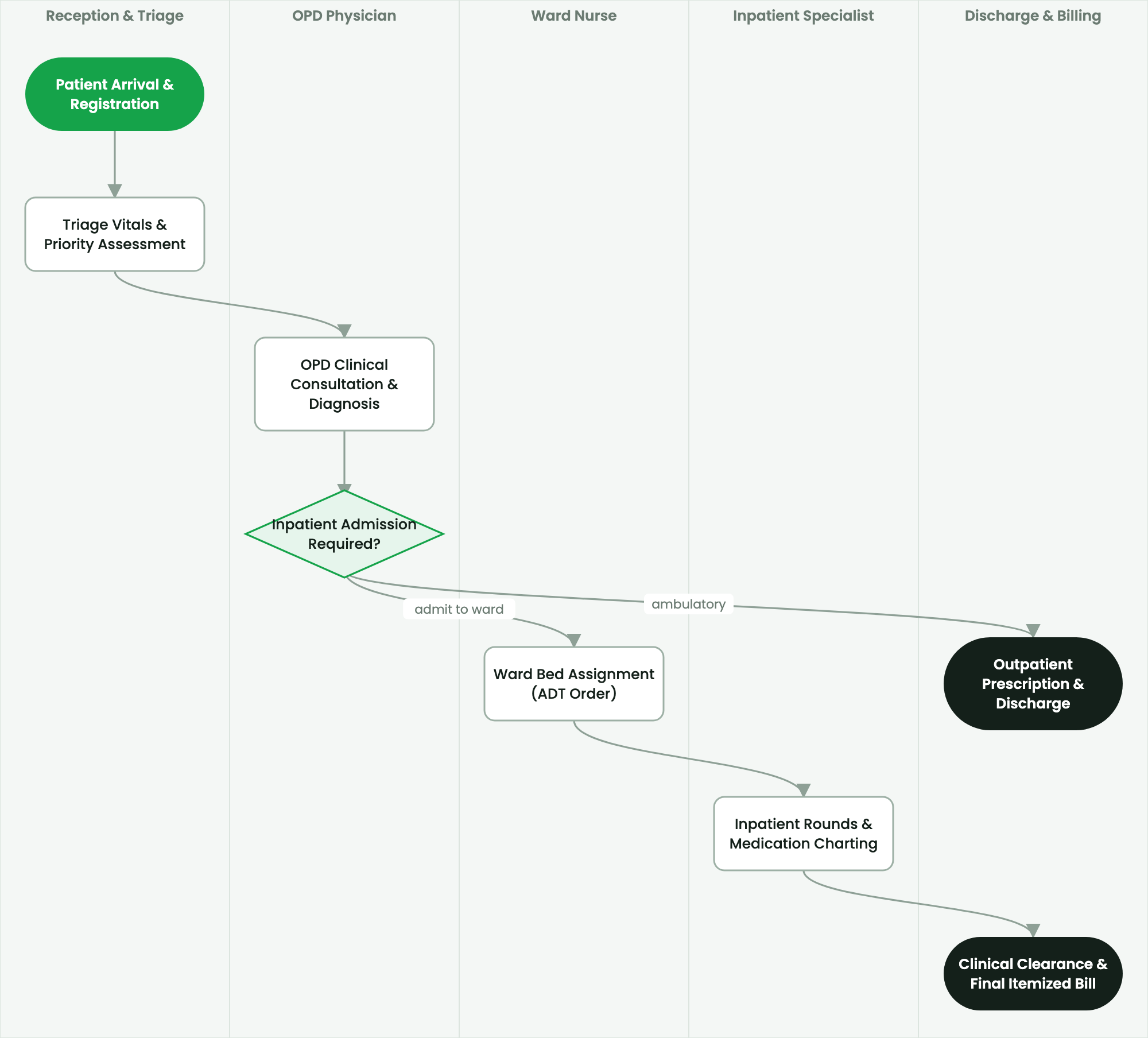
Clinical guide for physicians to document outpatient encounters using structured SOAP notes, ICD-10 diagnostic coding, and electronic orders.
2. Prerequisites & Security Access Groups#
- Required Modules:
smarterp_healthcare, smarterp_clinical_core, smarterp_pharmacy - Security Groups:
Healthcare Receptionist(Technical ID:smarterp_healthcare.group_medical_receptionist)Physician / Attending Doctor(Technical ID:smarterp_healthcare.group_medical_doctor)Pharmacy Dispenser(Technical ID:smarterp_healthcare.group_medical_pharmacist)
- Master Data Dependencies: Patient master registry (Medical Record Number - MRN), EFDA drug formulary, Ethiopian Ministry of Health (MoH) HMIS disease codes, and EHIS insurance tariffs.
3. Step-by-Step Configuration & Execution#
Step 1: Navigating to the Interface#
- Log into your SmartERP instance at
https://smarterp.et/odoo. - Open the main App Switcher (grid icon in the top-left corner).
- Navigate to Hospital → Patient Management → OPD / IPD.
Step 2: Operational Data Parameters & Controls#
Ensure all mandatory parameters comply with enterprise operational standards:
- Authorized Operator: Action executed under assigned RBAC permissions (Chief Medical Officer, Clinical Nurse, Receptionist, Pharmacist).
- Relational Integrity: Linked to upstream master records, approval requests, or transactional ledgers.
- Statutory & Quality Controls: Verified against Ethiopian statutory regulations and corporate governance standards.
Step 3: Operational Execution & State Progression#
- State Progression Gate: Advance record from Draft through Audited to Confirmed / Certified.
- Integrated System Impact: Automatically updates real-time operational states and posts financial/inventory journal moves.
- Audit Verification: System registers tamper-evident audit records logging user ID, timestamp, and cryptographic transaction digests.
Physician Workspace Navigation#
The physician workspace organizes waiting patients, active encounters, and diagnostic results in an ergonomic single-screen dashboard. Clinicians view the patient's longitudinal medical history, previous admissions, chronic medications, and active allergies without leaving the consultation canvas.
Documenting Structured SOAP Clinical Notes#
Medical notes adhere to the internationally recognized SOAP structure:
- S - Subjective: Record chief complaints, history of presenting illness (HPI), review of systems (ROS), and past medical/surgical history.
- O - Objective: Physical examination findings organized by system (General Appearance, HEENT, Respiratory, Cardiovascular, Abdomen, Neurological).
- A - Assessment: Working and differential diagnoses linked to the ICD-10 clinical coding dictionary.
- P - Plan: Therapeutic management plan, diagnostic orders (laboratory, radiology), non-pharmacological advice, and follow-up schedules.
ICD-10 Diagnostic Coding & Morbidity Reporting#
Accurate diagnostic coding ensures clinical auditability and feeds statutory MoH HMIS outpatient morbidity registers:
- In the Assessment tab, type the clinical term or code (e.g.,
TyphoidorA01.0). - Select the matching entry from the standardized ICD-10 classification database.
- Designate the diagnosis as Primary Working Diagnosis, Secondary / Comorbid, or Rule Out / Differential.
- Specify encounter type: New Case or Repeat Visit (crucial for HMIS annual disease incidence tracking).
Electronic Ordering: Labs, Imaging & Referrals#
- Click Add Order on the consultation toolbar.
- Select Laboratory Investigation to order hematology, clinical chemistry, microbiology, or serology profiles.
- Select Radiology Request for X-rays, ultrasound, CT, or MRI scans, specifying clinical indication and anatomical view.
- Select Internal Referral to route the patient to specialty clinics (e.g., Ophthalmology, Cardiology, Dental).
- Click Sign & Authorize. Orders instantly appear on departmental worklists with real-time tracking badges.
4. Advanced Configuration Points#
- Automated Actions & Scheduled Tasks (Crons):
Healthcare: Generate daily MoH HMIS aggregate tally(smarterp_healthcare.ir_cron_hmis_sync): Runs daily at 23:00 to prepare DHIS2 health data summariesPharmacy: Flag expiring EFDA medicine batches(smarterp_healthcare.ir_cron_fefo_expiry): Runs daily at 06:00 to alert dispensers of lots expiring within 60 days
- Custom Print Templates & Reports:
- Official Patient Encounter Summary & Medical Certificate
- Electronic Prescription Order Form (Model 19 Compliant)
- Ethiopian Health Insurance Service (EHIS) Claim Dossier
- Daily MoH Outpatient / Inpatient Morbidity Tally Sheet
- Multi-Company Rules: Record-level security isolation under Company 1 (
Ashewa Technology Solutions S.C.), preventing cross-company ledger leakage across parent and subsidiary legal entities.
5. Comprehensive Troubleshooting Matrix#
| Error Symptom / Exception | Probable Root Cause | Corrective Action / Resolution |
|---|---|---|
Access Block: Confidential clinical diagnosis restricted | User is not listed as the patient's attending physician or authorized consultant. | Request explicit clinical consultation delegation from the department head. |
Credit Ceiling Block: Corporate insurance expired | Patient corporate insurance policy limit exceeded or expired. | Switch billing mode to private cash settlement or upload pre-authorization approval from the insurer. |
FEFO Allocation Error: Expired medicine batch blocked | Dispenser selected medicine lot past statutory EFDA expiry date. | Isolate expired lot to quarantine storage and dispense compliant active lot. |