Execute automated 3-way matching
Configure automated quantity and price tolerances, audit variance discrepancies, and release vendor bills for payment.
1. Overview & Business Value#
This comprehensive operational guide details the architecture, business workflows, configuration parameters, and execution steps for Execute automated 3-way matching within SmartERP.
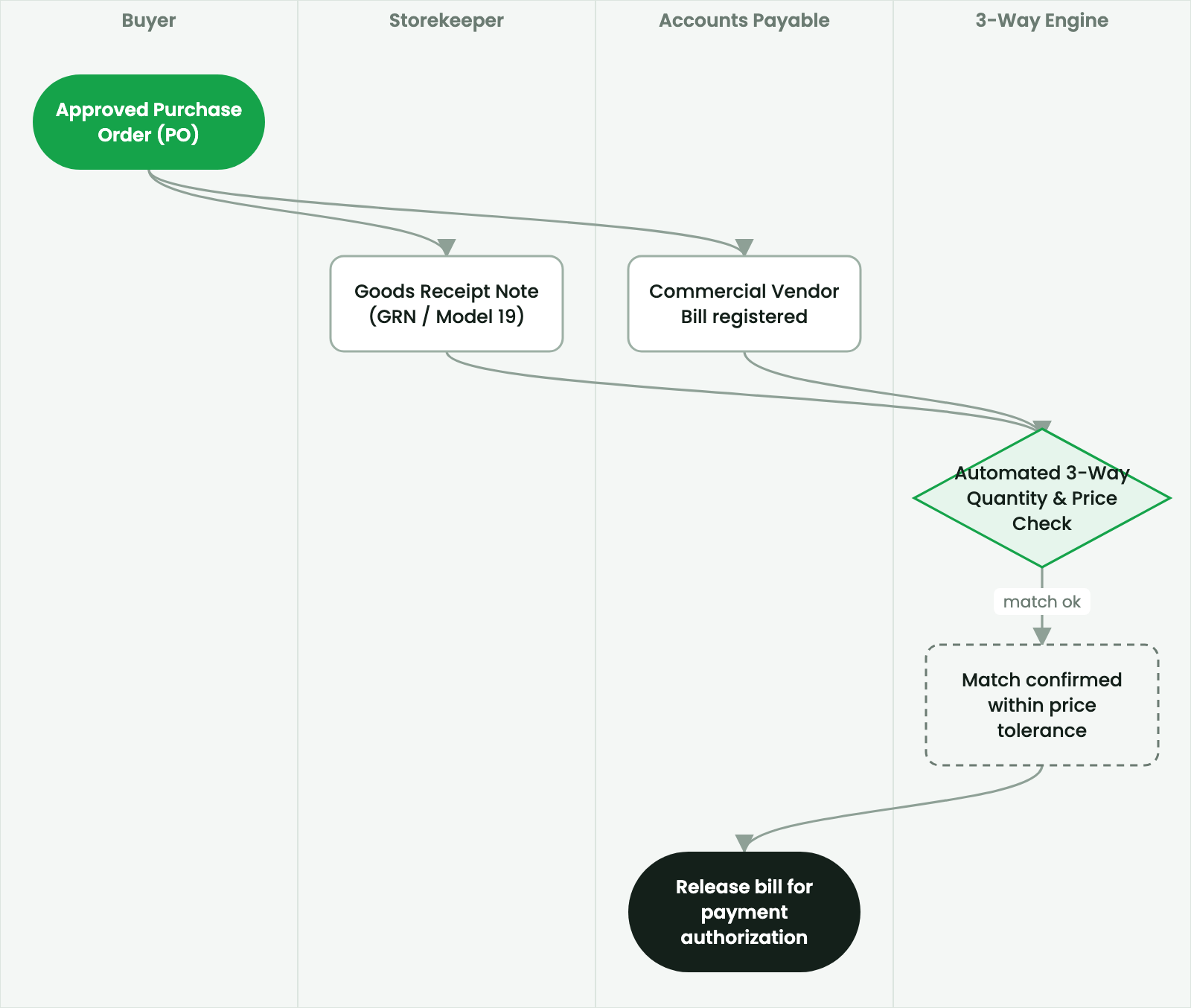
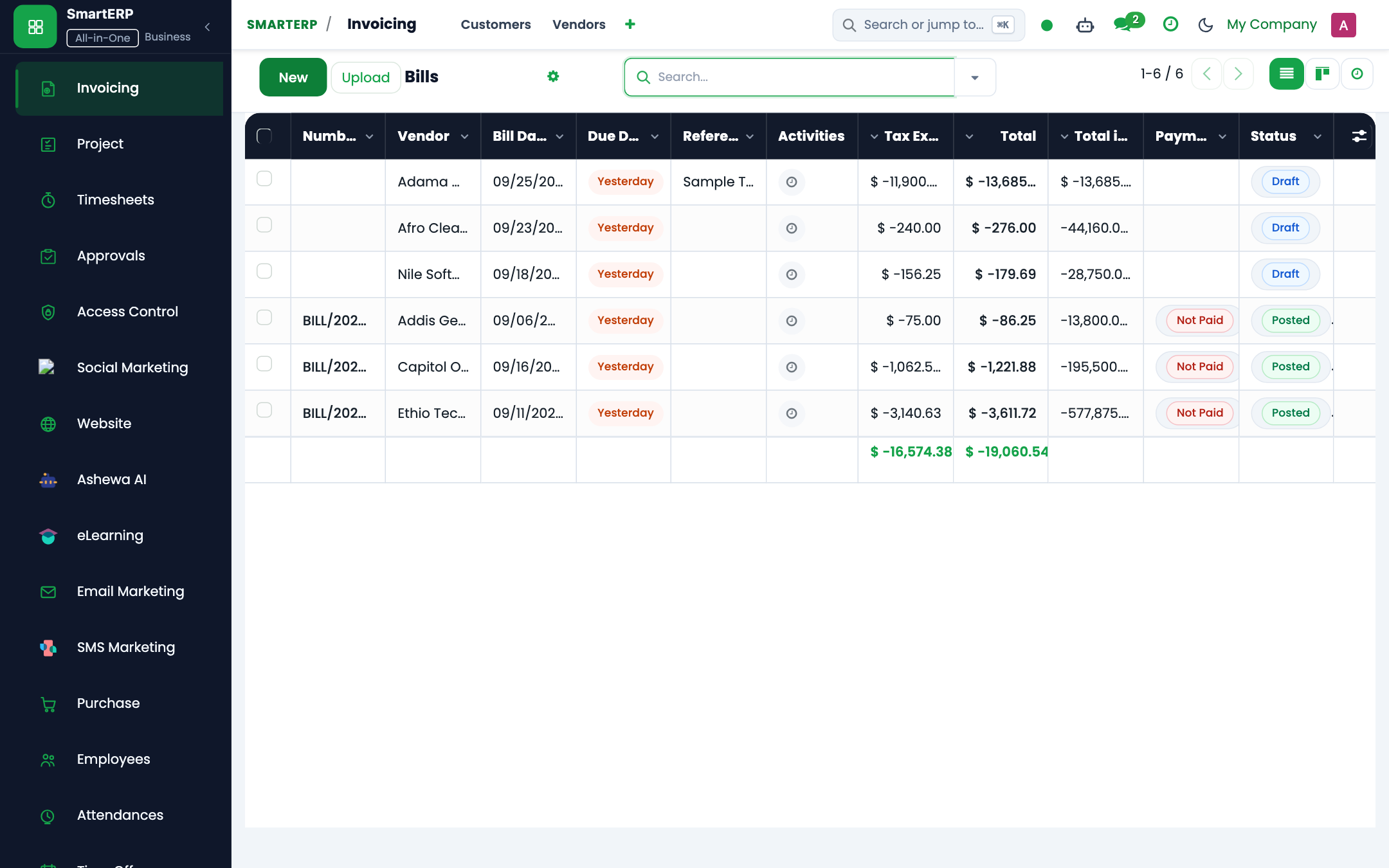
This guide explains how the finance and accounts payable team verifies supplier invoices against purchase orders and receiving notes.
2. Prerequisites & Security Access Groups#
- Required Modules:
purchase, stock, smarterp_store_voucher, purchase_requisition - Security Groups:
Purchase User(Technical ID:purchase.group_purchase_user)Purchase Administrator(Technical ID:purchase.group_purchase_manager)Inventory User / Storekeeper(Technical ID:stock.group_stock_user)
- Master Data Dependencies: Product masters, units of measure, approved supplier catalog, warehouse storage locations, and procurement budget lines.
3. Step-by-Step Configuration & Execution#
Step 1: Navigating to the Interface#
- Log into your SmartERP instance at
https://smarterp.et/odoo. - Open the main App Switcher (grid icon in the top-left corner).
- Navigate to Accounting → Vendors → Bills.
Step 2: Operational Data Parameters & Controls#
Verify that mandatory and statutory fields are populated in accordance with enterprise policies:
- Designated Authority / Actor: Operating under verified RBAC role (Accounts Payable Specialist, Financial Controller, Internal Auditor).
- Associated Transactional Documents: Bound to upstream requisition, tender package, or purchase order contracts.
- Statutory Regulatory Validation: Strict adherence to Ethiopian Public Procurement Guidelines, Customs declarations, or Ministry of Revenue tax rules (VAT Proclamation 1157/2019, Withholding Proclamation 979/2016).
Step 3: Transactional Execution & State Progression#
- State Transition Gate: Progress the operational state from Draft through Audited to Confirmed / Posted.
- Double-Entry Financial Impact: Validated transactions automatically generate immutable accounting journal entries (
account.move) or stock move quant records (stock.move.line). - Audit Verification: System registers tamper-evident audit records logging user ID, timestamp, and cryptographic transaction digests.
3-Way Match Verification Checklist#
When Accounts Payable registers a vendor bill, SmartERP validates:
| Document | Verified Field | Tolerance Rule |
|---|---|---|
| Purchase Order (PO) | Unit Price, Currency, Terms | Must match agreed contract price. |
| Model 19 (GRN) | Received & Accepted Quantity | Invoiced quantity cannot exceed received quantity. |
| Vendor Bill | Tax TIN, Total Invoice Sum | Line totals must balance with GRN quantities. |
Handling Exceptions#
If a price variance occurs (e.g. supplier billed 13,000 ETB instead of contracted 12,500 ETB):
- The bill displays a red warning banner: 3-Way Match Exception: Unit Price Variance Detected.
- Posting is blocked.
- Accounts Payable has two options:
- Reject Bill: Request revised invoice from supplier matching agreed PO price.
- Request Tolerance Override: If fuel surcharge or contractual escalation applies, Procurement Manager must approve the variance.
4. Advanced Configuration Points#
- Automated Actions & Scheduled Tasks (Crons):
Procurement: Run scheduler (reordering rules)(stock.ir_cron_run_procurement): Runs daily to generate RFQs for inventory items below safety stockStock: Expired lot quarantine trigger(stock.ir_cron_quarantine_expired): Runs daily to isolate batches past shelf lifePurchase: Check supplier delivery deadlines(purchase.ir_cron_check_deadlines): Runs daily to send automated expediting notices to suppliers
- Custom Print Templates & Reports:
- Purchase Order Confirmation (Commercial Contract)
- Ethiopian Goods Receiving Note (GRN / Model 19)
- Store Issue Voucher (SIV / Model 20)
- Vendor Bid Evaluation & Comparison Matrix
- Multi-Company Rules: Record-level security isolation under Company 1 (
Ashewa Technology Solutions S.C.), preventing cross-company ledger leakage across parent and subsidiary legal entities.
5. Comprehensive Troubleshooting Matrix#
| Error Symptom / Exception | Probable Root Cause | Corrective Action / Resolution |
|---|---|---|
Access Rights Error: Cannot confirm Purchase Order | User lacks purchase manager approval privileges. | Escalate order to user with purchase.group_purchase_manager clearance. |
Validation Error: Stock move destination missing | Operation type lacks default internal destination location. | Configure target warehouse location in Inventory → Configuration → Operation Types. |
Quantity Mismatch: GRN vs PO 3-way match failed | Delivered quantity exceeds purchase order limit beyond allowable tolerance. | Verify physical delivery against supplier delivery slip and issue an amended PO or return voucher. |
Budget Reservation Error: Insufficient funds | Departmental budget allocation exhausted for target analytic account. | Submit a budget transfer or supplementary allocation request to the Finance Director. |
Next#
- Landed costs: Allocate customs duty and landed costs.
Last updated: 2026-11-15