Ward Bed Management & Real-Time Occupancy
Configure hospital wards, room classes, bed tariffs, and monitor occupancy metrics across inpatient departments.
1. Overview & Business Value#
This comprehensive operational guide details the architecture, business workflows, configuration parameters, and execution steps for Ward Bed Management & Real-Time Occupancy within SmartERP.
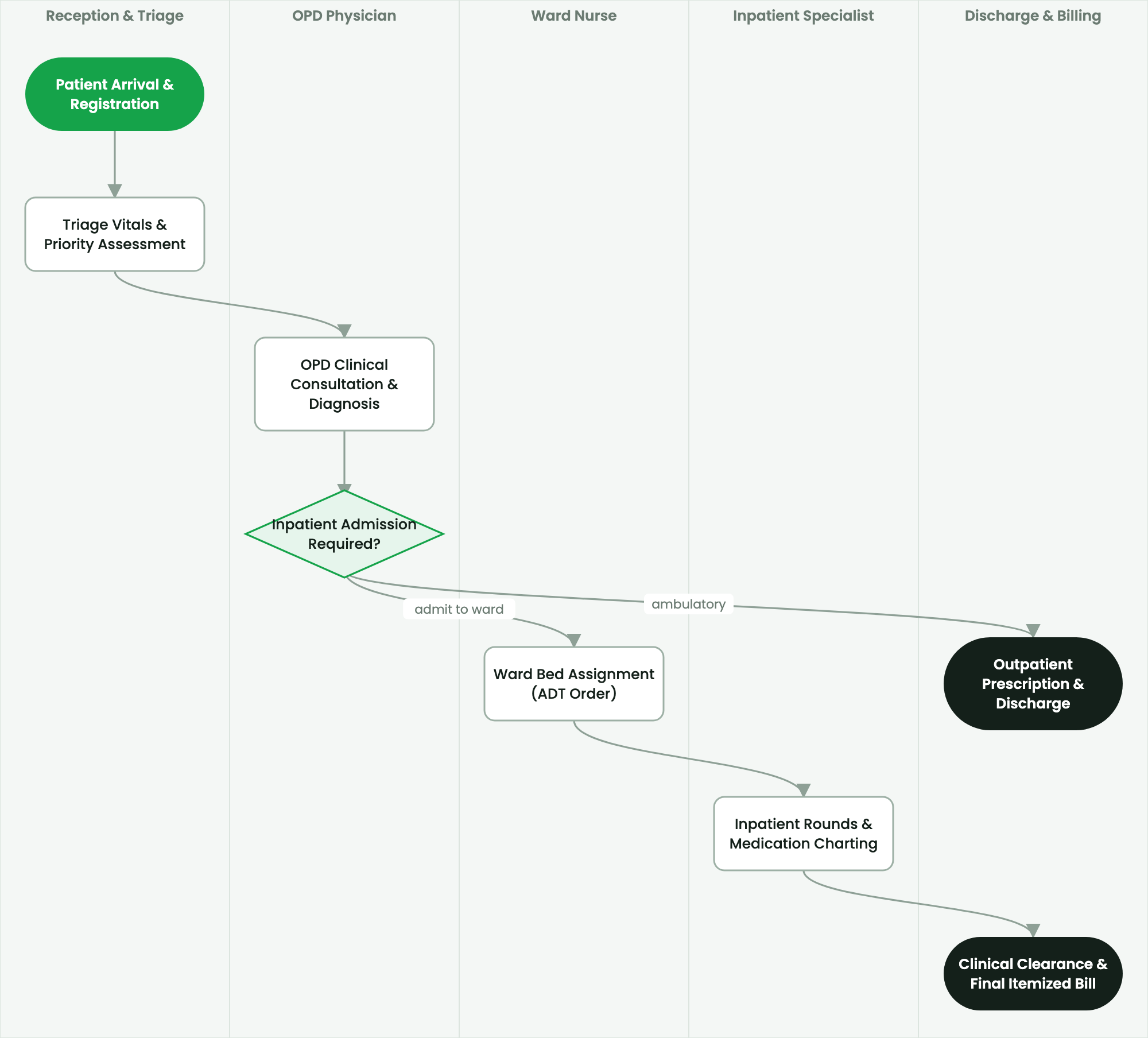
Configure hospital wards, room classes, bed tariffs, and monitor occupancy metrics across inpatient departments.
2. Prerequisites & Security Access Groups#
- Required Modules:
smarterp_healthcare, smarterp_clinical_core, smarterp_pharmacy - Security Groups:
Healthcare Receptionist(Technical ID:smarterp_healthcare.group_medical_receptionist)Physician / Attending Doctor(Technical ID:smarterp_healthcare.group_medical_doctor)Pharmacy Dispenser(Technical ID:smarterp_healthcare.group_medical_pharmacist)
- Master Data Dependencies: Patient master registry (Medical Record Number - MRN), EFDA drug formulary, Ethiopian Ministry of Health (MoH) HMIS disease codes, and EHIS insurance tariffs.
3. Step-by-Step Configuration & Execution#
Step 1: Navigating to the Interface#
- Log into your SmartERP instance at
https://smarterp.et/odoo. - Open the main App Switcher (grid icon in the top-left corner).
- Navigate to Hospital → Patient Management → OPD / IPD.
Step 2: Operational Data Parameters & Controls#
Ensure all mandatory parameters comply with enterprise operational standards:
- Authorized Operator: Action executed under assigned RBAC permissions (Chief Medical Officer, Clinical Nurse, Receptionist, Pharmacist).
- Relational Integrity: Linked to upstream master records, approval requests, or transactional ledgers.
- Statutory & Quality Controls: Verified against Ethiopian statutory regulations and corporate governance standards.
Step 3: Operational Execution & State Progression#
- State Progression Gate: Advance record from Draft through Audited to Confirmed / Certified.
- Integrated System Impact: Automatically updates real-time operational states and posts financial/inventory journal moves.
- Audit Verification: System registers tamper-evident audit records logging user ID, timestamp, and cryptographic transaction digests.
Hospital Ward Hierarchy Setup#
SmartERP structures physical hospital facilities hierarchically:
$$\text{Hospital Facility} \longrightarrow \text{Building / Wing} \longrightarrow \text{Ward} \longrightarrow \text{Room} \longrightarrow \text{Bed}$$
To configure a new ward:
- Navigate to Healthcare > Configuration > Facility Structure > Wards.
- Click New and define ward attributes:
- Ward Name & Code: e.g.,
Pediatric Medical Ward (PED-MED). - Department:
Pediatrics. - Gender Policy:
Female Only,Male Only,Mixed / Pediatric, orUnrestricted. - Supervising Head Nurse: Assign responsible staff.
- Ward Name & Code: e.g.,
Configuring Rooms and Bed Tariffs#
- Under the selected ward, click Add Room.
- Define the room type:
General Ward (Multi-Bed),Semi-Private (2 Beds),Private VIP Suite, orNegative Pressure Isolation. - Add bed records specifying unique bed numbers (e.g.,
BED-101,BED-102). - Link each bed type to its billing service product (
account.move.line):- General Ward Bed Day: 450.00 ETB / day.
- Semi-Private Room: 1,200.00 ETB / day.
- Private VIP Suite: 3,500.00 ETB / day.
- Intensive Care Unit (ICU): 6,000.00 ETB / day.
- Set billing calculation method: Calendar Day or Midnight Cutoff (24:00).
Visual Bed Occupancy Canvas#
The real-time bed board provides immediate situational awareness across all hospital wings:
- 🟢 Available (Green): Cleaned, sanitized, and ready for immediate patient placement.
- 🔴 Occupied (Red): Inpatient actively assigned; hover reveals patient name, MRN, and attending doctor.
- 🟡 Reserved (Yellow): Held for an incoming emergency or elective surgical admission.
- 🔵 Cleaning / Turnover (Blue): Vacated by discharged patient; awaiting housekeeping sanitization.
- ⚫ Maintenance (Black): Bed, oxygen console, or monitor undergoing repair.
Key Inpatient Metrics Calculation#
SmartERP continuously computes statutory MoH performance indicators:
$$\text{Bed Occupancy Rate (BOR)} = \frac{\text{Total Inpatient Bed Days Observed}}{\text{Total Available Beds} \times \text{Number of Days in Period}} \times 100\%$$
$$\text{Average Length of Stay (ALOS)} = \frac{\text{Total Inpatient Bed Days of Discharged Patients}}{\text{Total Discharges and Deaths}}$$
4. Advanced Configuration Points#
- Automated Actions & Scheduled Tasks (Crons):
Healthcare: Generate daily MoH HMIS aggregate tally(smarterp_healthcare.ir_cron_hmis_sync): Runs daily at 23:00 to prepare DHIS2 health data summariesPharmacy: Flag expiring EFDA medicine batches(smarterp_healthcare.ir_cron_fefo_expiry): Runs daily at 06:00 to alert dispensers of lots expiring within 60 days
- Custom Print Templates & Reports:
- Official Patient Encounter Summary & Medical Certificate
- Electronic Prescription Order Form (Model 19 Compliant)
- Ethiopian Health Insurance Service (EHIS) Claim Dossier
- Daily MoH Outpatient / Inpatient Morbidity Tally Sheet
- Multi-Company Rules: Record-level security isolation under Company 1 (
Ashewa Technology Solutions S.C.), preventing cross-company ledger leakage across parent and subsidiary legal entities.
5. Comprehensive Troubleshooting Matrix#
| Error Symptom / Exception | Probable Root Cause | Corrective Action / Resolution |
|---|---|---|
Access Block: Confidential clinical diagnosis restricted | User is not listed as the patient's attending physician or authorized consultant. | Request explicit clinical consultation delegation from the department head. |
Credit Ceiling Block: Corporate insurance expired | Patient corporate insurance policy limit exceeded or expired. | Switch billing mode to private cash settlement or upload pre-authorization approval from the insurer. |
FEFO Allocation Error: Expired medicine batch blocked | Dispenser selected medicine lot past statutory EFDA expiry date. | Isolate expired lot to quarantine storage and dispense compliant active lot. |