Radiology & Diagnostic Imaging (RIS / PACS)
Workflow guide for scheduling imaging requests, performing X-ray, Ultrasound, CT, and MRI exams, and authoring radiological reports.
1. Overview & Business Value#
This comprehensive operational guide details the architecture, business workflows, configuration parameters, and execution steps for Radiology & Diagnostic Imaging (RIS / PACS) within SmartERP.
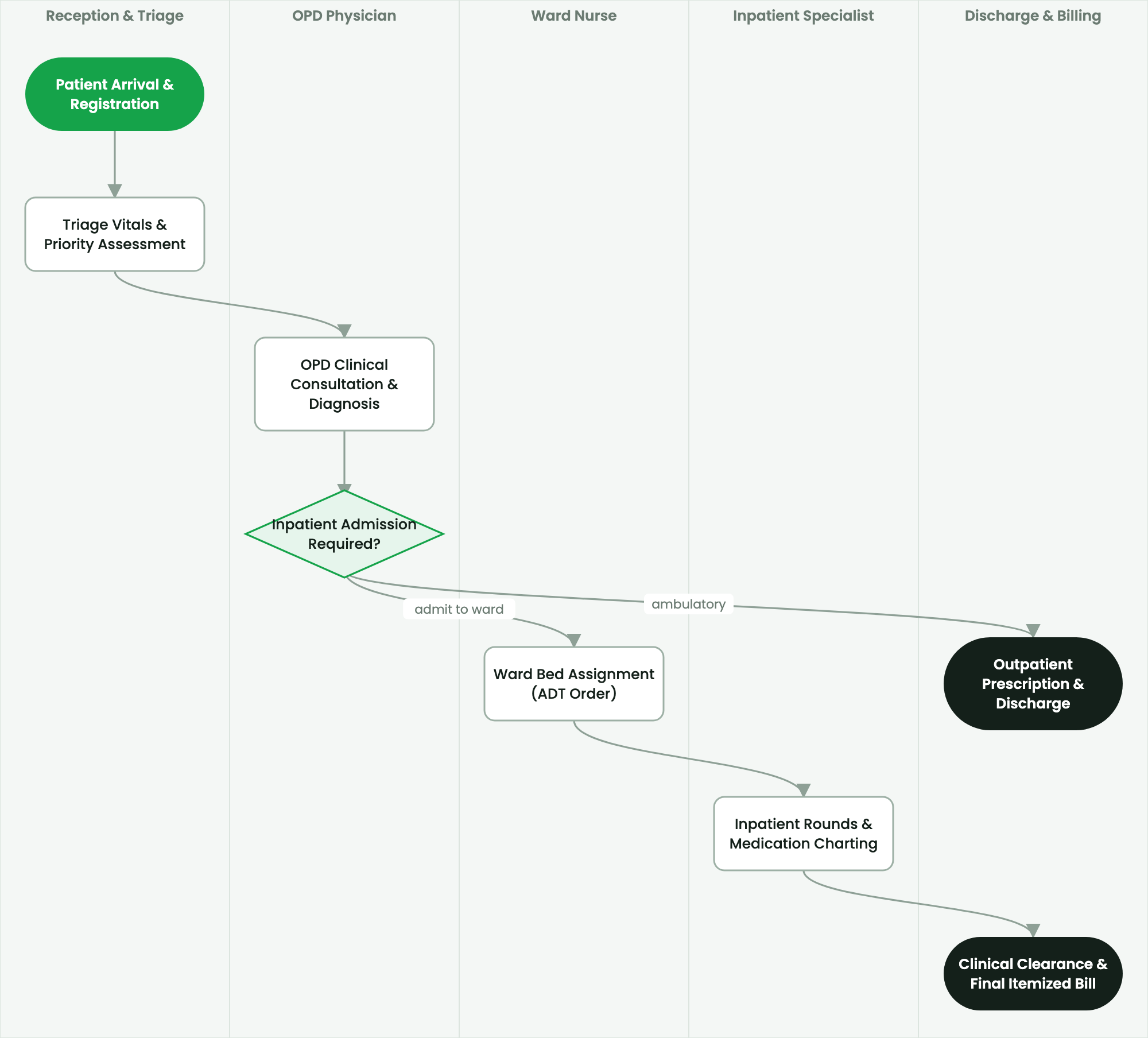
Workflow guide for scheduling imaging requests, performing X-ray, Ultrasound, CT, and MRI exams, and authoring radiological reports.
2. Prerequisites & Security Access Groups#
- Required Modules:
smarterp_healthcare, smarterp_clinical_core, smarterp_pharmacy - Security Groups:
Healthcare Receptionist(Technical ID:smarterp_healthcare.group_medical_receptionist)Physician / Attending Doctor(Technical ID:smarterp_healthcare.group_medical_doctor)Pharmacy Dispenser(Technical ID:smarterp_healthcare.group_medical_pharmacist)
- Master Data Dependencies: Patient master registry (Medical Record Number - MRN), EFDA drug formulary, Ethiopian Ministry of Health (MoH) HMIS disease codes, and EHIS insurance tariffs.
3. Step-by-Step Configuration & Execution#
Step 1: Navigating to the Interface#
- Log into your SmartERP instance at
https://smarterp.et/odoo. - Open the main App Switcher (grid icon in the top-left corner).
- Navigate to Hospital → Patient Management → OPD / IPD.
Step 2: Operational Data Parameters & Controls#
Ensure all mandatory parameters comply with enterprise operational standards:
- Authorized Operator: Action executed under assigned RBAC permissions (Chief Medical Officer, Clinical Nurse, Receptionist, Pharmacist).
- Relational Integrity: Linked to upstream master records, approval requests, or transactional ledgers.
- Statutory & Quality Controls: Verified against Ethiopian statutory regulations and corporate governance standards.
Step 3: Operational Execution & State Progression#
- State Progression Gate: Advance record from Draft through Audited to Confirmed / Certified.
- Integrated System Impact: Automatically updates real-time operational states and posts financial/inventory journal moves.
- Audit Verification: System registers tamper-evident audit records logging user ID, timestamp, and cryptographic transaction digests.
Radiology Information System (RIS) Overview#
SmartERP RIS manages diagnostic imaging orders across modalities, scheduling scan rooms, tracking patient preparation, and connecting to Picture Archiving and Communication Systems (PACS) via DICOM standards.
Scheduling and Performing Imaging Examinations#
- Navigate to Healthcare > Radiology > Pending Orders.
- Select the imaging request ordered by the physician.
- Verify safety screening:
- MRI Safety Screening: Verify absence of cardiac pacemakers, ferromagnetic metallic implants, or cerebral aneurysm clips.
- CT Contrast Clearance: Check serum creatinine and estimated GFR ($eGFR$) for contrast medium safety.
- Pregnancy Screening: Mandatory radiation risk assessment for female patients of reproductive age.
- Assign the examination to an imaging suite (e.g.,
X-Ray Room 02,Ultrasound Suite 01,128-Slice CT Scanner). - The radiographer completes the scan and uploads the DICOM Study Instance UID into the worklist.
Radiologist Reporting & Structured Templates#
- In Healthcare > Radiology > Radiologist Workspace, select the completed exam.
- Click Launch DICOM Viewer to view high-resolution image slices side-by-side with clinical history.
- Author the structured report utilizing standardized reporting templates:
- Clinical Indication: Reason for study.
- Technique & Protocol: Modality, views obtained, contrast volume administered.
- Findings: Systematic anatomical description (e.g., lung parenchyma, pleura, mediastinum, cardiothoracic ratio).
- Impression: Crisp diagnostic conclusion matching ACR/BI-RADS or standard radiological classifications.
- Digitally sign the report.
- The verified report locks against alteration and attaches permanently to the patient's electronic medical file.
4. Advanced Configuration Points#
- Automated Actions & Scheduled Tasks (Crons):
Healthcare: Generate daily MoH HMIS aggregate tally(smarterp_healthcare.ir_cron_hmis_sync): Runs daily at 23:00 to prepare DHIS2 health data summariesPharmacy: Flag expiring EFDA medicine batches(smarterp_healthcare.ir_cron_fefo_expiry): Runs daily at 06:00 to alert dispensers of lots expiring within 60 days
- Custom Print Templates & Reports:
- Official Patient Encounter Summary & Medical Certificate
- Electronic Prescription Order Form (Model 19 Compliant)
- Ethiopian Health Insurance Service (EHIS) Claim Dossier
- Daily MoH Outpatient / Inpatient Morbidity Tally Sheet
- Multi-Company Rules: Record-level security isolation under Company 1 (
Ashewa Technology Solutions S.C.), preventing cross-company ledger leakage across parent and subsidiary legal entities.
5. Comprehensive Troubleshooting Matrix#
| Error Symptom / Exception | Probable Root Cause | Corrective Action / Resolution |
|---|---|---|
Access Block: Confidential clinical diagnosis restricted | User is not listed as the patient's attending physician or authorized consultant. | Request explicit clinical consultation delegation from the department head. |
Credit Ceiling Block: Corporate insurance expired | Patient corporate insurance policy limit exceeded or expired. | Switch billing mode to private cash settlement or upload pre-authorization approval from the insurer. |
FEFO Allocation Error: Expired medicine batch blocked | Dispenser selected medicine lot past statutory EFDA expiry date. | Isolate expired lot to quarantine storage and dispense compliant active lot. |
Last updated: 2026-11-15