Configure Vehicle Master Records and Plate Registry
Vehicle master setup: Ethiopian plate categories (Code 1/2/3/UN/ET), VIN verification, GPS tracking, and technical specifications.
1. Overview & Business Value#
This comprehensive operational guide details the architecture, business workflows, configuration parameters, and execution steps for Configure Vehicle Master Records and Plate Registry within SmartERP.
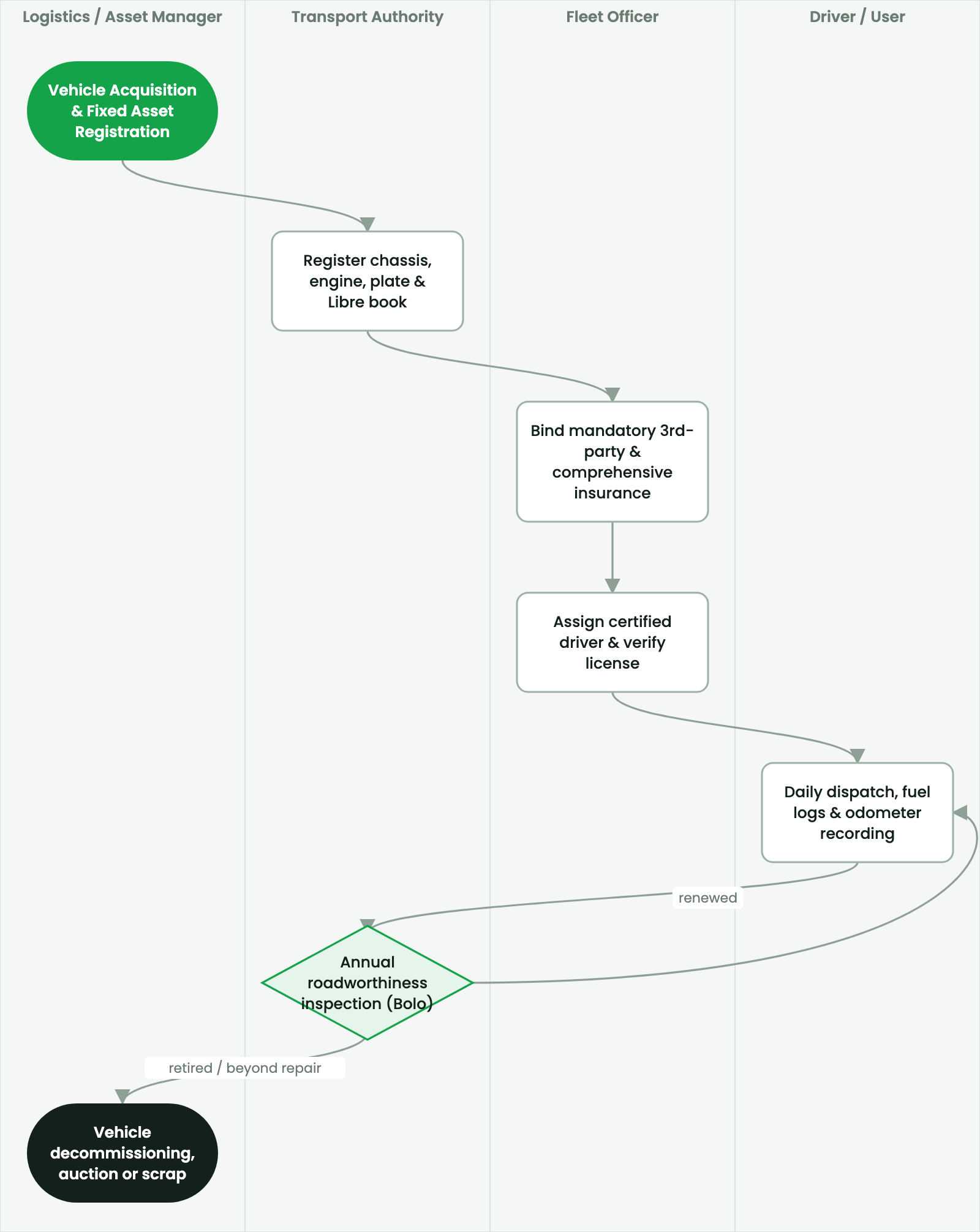
Vehicle master setup: Ethiopian plate categories (Code 1/2/3/UN/ET), VIN verification, GPS tracking, and technical specifications.
2. Prerequisites & Security Access Groups#
- Required Modules:
fleet, smarterp_fleet_operations, smarterp_fleet_insurance - Security Groups:
Fleet Operator(Technical ID:fleet.group_fleet_user)Fleet Administrator / Transport Manager(Technical ID:fleet.group_fleet_manager)
- Master Data Dependencies: Vehicle asset cards, license plate registry, fuel cards, driver profiles, scheduled maintenance intervals, and third-party insurance policies.
3. Step-by-Step Configuration & Execution#
Step 1: Navigating to the Interface#
- Log into your SmartERP instance at
https://smarterp.et/odoo. - Open the main App Switcher (grid icon in the top-left corner).
- Navigate to Fleet → Vehicles.
Step 2: Operational Data Parameters & Controls#
Ensure all mandatory parameters comply with enterprise operational standards:
- Authorized Operator: Action executed under assigned RBAC permissions (Fleet Manager, Dispatch Officer, Maintenance Supervisor).
- Relational Integrity: Linked to upstream master records, approval requests, or transactional ledgers.
- Statutory & Quality Controls: Verified against Ethiopian statutory regulations and corporate governance standards.
Step 3: Operational Execution & State Progression#
- State Progression Gate: Advance record from Draft through Audited to Confirmed / Certified.
- Integrated System Impact: Automatically updates real-time operational states and posts financial/inventory journal moves.
- Audit Verification: System registers tamper-evident audit records logging user ID, timestamp, and cryptographic transaction digests.
Ethiopian License Plate Classification#
SmartERP categorizes vehicles according to Federal Transport Authority registration plates:
- Code 1 (Red / Yellow): Government and public service vehicles.
- Code 2 (Blue / White): Commercial passenger vehicles (taxis, city buses).
- Code 3 (Green / White): Commercial freight trucks and privately owned business vehicles.
- ET (Blue / Yellow): Federal Ethiopian Government ministries and state-owned enterprises.
- UN / CD (Red / Green): United Nations agencies and accredited diplomatic missions.
Procedure: Creating an Asset-Linked Vehicle#
- Navigate to Fleet > Vehicles > Vehicles and click New.
- Identification Section:
- Enter License Plate with regional prefix (e.g.,
3-B45210 AAfor Addis Ababa). - Enter Chassis / VIN Number and Engine Number.
- Enter License Plate with regional prefix (e.g.,
- Asset Tagging & Fixed Asset Link:
- In the Accounting tab, link the vehicle to its Fixed Asset Card (
account.asset). - SmartERP synchronizes monthly depreciation schedules directly with vehicle TCO reports.
- In the Accounting tab, link the vehicle to its Fixed Asset Card (
- Engine & Fuel Parameters:
- Transmission:
Manual 5-Speed/Automatic. - Fuel Type:
Diesel/Gasoline/Electric. - Fuel Tank Capacity:
130Liters. - Target Fuel Consumption:
8.5 km/L.
- Transmission:
- Click Save.
4. Advanced Configuration Points#
- Automated Actions & Scheduled Tasks (Crons):
Fleet: Trigger preventive maintenance intervals(fleet.ir_cron_service_interval): Runs daily to alert transport officers when vehicles approach service kilometer thresholdsInsurance: Alert expiring third-party liability policies(fleet.ir_cron_insurance_alert): Runs weekly to flag insurance policies expiring within 30 days
- Custom Print Templates & Reports:
- Vehicle Preventive Maintenance Work Order
- Fleet Fuel Consumption & Mileage Analysis (km/L)
- Third-Party Liability & Comprehensive Insurance Schedule
- Driver Incident & Vehicle Lifecycle Cost Ledger
- Multi-Company Rules: Record-level security isolation under Company 1 (
Ashewa Technology Solutions S.C.), preventing cross-company ledger leakage across parent and subsidiary legal entities.
5. Comprehensive Troubleshooting Matrix#
| Error Symptom / Exception | Probable Root Cause | Corrective Action / Resolution |
|---|---|---|
Service Due Warning: Odometer exceeds threshold | Vehicle operating past scheduled oil change or brake inspection kilometer mark. | Ground vehicle and schedule immediate maintenance in Fleet → Services. |
Policy Expired Block: Vehicle grounded | Mandatory statutory third-party liability insurance has elapsed. | Renew insurance policy with underwriter and update expiration date on vehicle card before release. |
Fuel Anomaly Warning: Consumption exceeds normal rate | Logged fuel volume exceeds vehicle fuel tank capacity or normal kilometer ratio. | Audit driver logbook, inspect fuel card receipts, and perform fuel tank sensor diagnostic. |
Last updated: 2026-11-15