Manage Fuel Logs, Vouchers, and Consumption Benchmarks
Recording fuel purchases, TotalEnergies/NOC/Ola coupons, telematics fuel calibration, and detecting fuel theft.
1. Overview & Business Value#
This comprehensive operational guide details the architecture, business workflows, configuration parameters, and execution steps for Manage Fuel Logs, Vouchers, and Consumption Benchmarks within SmartERP.
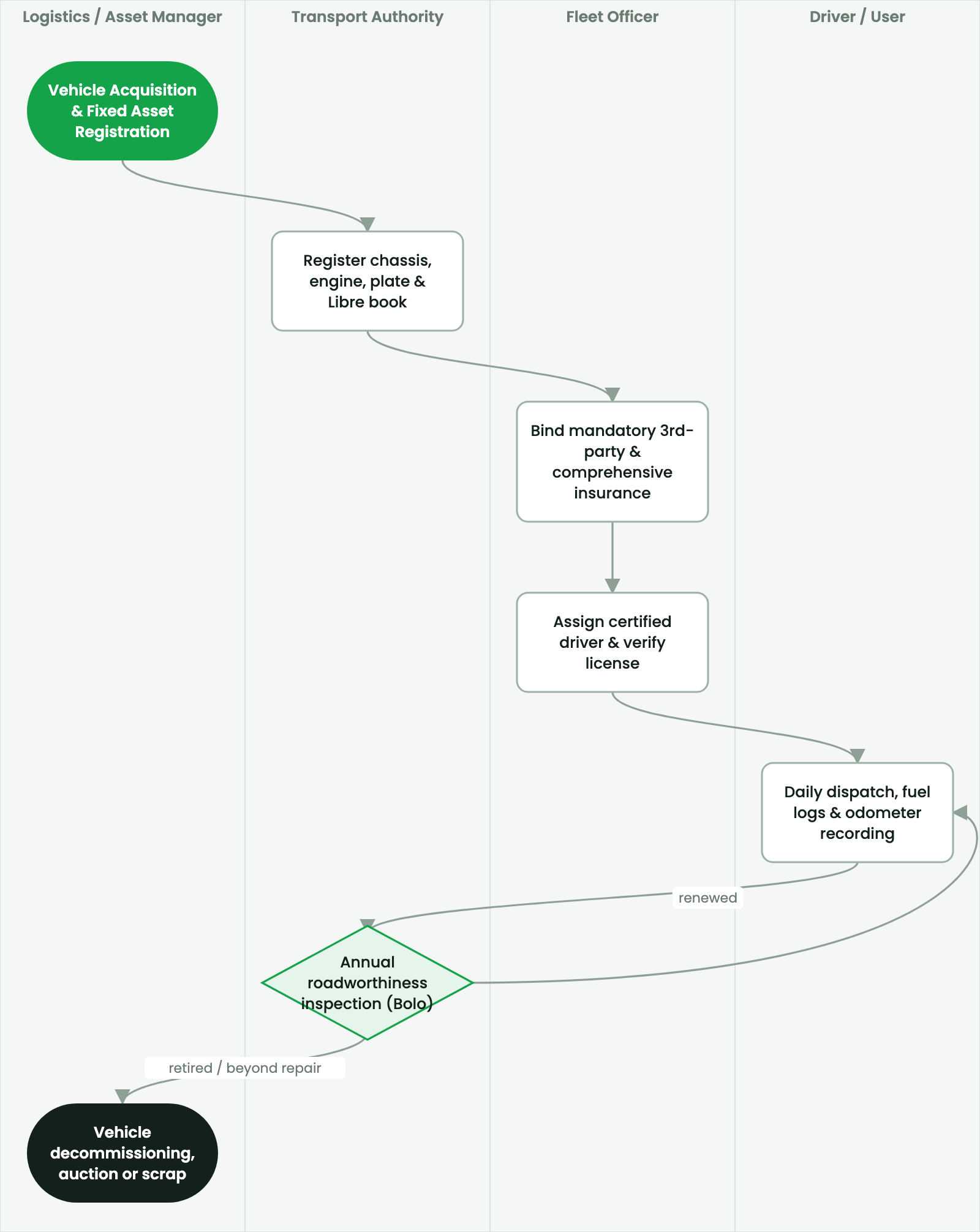
Recording fuel purchases, TotalEnergies/NOC/Ola coupons, telematics fuel calibration, and detecting fuel theft.
2. Prerequisites & Security Access Groups#
- Required Modules:
fleet, smarterp_fleet_operations, smarterp_fleet_insurance - Security Groups:
Fleet Operator(Technical ID:fleet.group_fleet_user)Fleet Administrator / Transport Manager(Technical ID:fleet.group_fleet_manager)
- Master Data Dependencies: Vehicle asset cards, license plate registry, fuel cards, driver profiles, scheduled maintenance intervals, and third-party insurance policies.
3. Step-by-Step Configuration & Execution#
Step 1: Navigating to the Interface#
- Log into your SmartERP instance at
https://smarterp.et/odoo. - Open the main App Switcher (grid icon in the top-left corner).
- Navigate to Fleet → Vehicles.
Step 2: Operational Data Parameters & Controls#
Ensure all mandatory parameters comply with enterprise operational standards:
- Authorized Operator: Action executed under assigned RBAC permissions (Fleet Manager, Dispatch Officer, Maintenance Supervisor).
- Relational Integrity: Linked to upstream master records, approval requests, or transactional ledgers.
- Statutory & Quality Controls: Verified against Ethiopian statutory regulations and corporate governance standards.
Step 3: Operational Execution & State Progression#
- State Progression Gate: Advance record from Draft through Audited to Confirmed / Certified.
- Integrated System Impact: Automatically updates real-time operational states and posts financial/inventory journal moves.
- Audit Verification: System registers tamper-evident audit records logging user ID, timestamp, and cryptographic transaction digests.
Fuel Expenditure Control#
Fuel represents between 35% and 55% of total fleet operating costs in Ethiopia. Controlling fuel consumption requires strict verification of fuel purchase receipts, corporate fuel card statements, and vehicle fuel efficiency benchmarks.
Procedure: Entering a Fuel Log#
- Navigate to Fleet > Operations > Fuel Logs and click New.
- Vehicle: Select the vehicle plate.
- Purchased Liters: Enter quantity (e.g.,
65.0L). - Total Price: Total purchase amount in ETB.
- Odometer at Fill-up: Enter the odometer reading at the fuel pump.
- Payment Mode:
- Corporate Fuel Card (e.g., Total Card, NOC Card).
- Cash / Telebirr Corporate disbursement.
- Central Yard Depot Tank pump meter.
- Click Save.
Anomaly Detection & Theft Investigation#
SmartERP compares actual km/L against the vehicle model's engineering standard:
- Standard:
8.5 km/L. - Tolerance Threshold:
±15%(allowing for traffic congestion or rough off-road terrain). - If actual consumption falls below
6.5 km/L, the system flags an Excessive Consumption Alert, routing the log to the Fleet Manager for audit and possible fuel siphon investigation.
4. Advanced Configuration Points#
- Automated Actions & Scheduled Tasks (Crons):
Fleet: Trigger preventive maintenance intervals(fleet.ir_cron_service_interval): Runs daily to alert transport officers when vehicles approach service kilometer thresholdsInsurance: Alert expiring third-party liability policies(fleet.ir_cron_insurance_alert): Runs weekly to flag insurance policies expiring within 30 days
- Custom Print Templates & Reports:
- Vehicle Preventive Maintenance Work Order
- Fleet Fuel Consumption & Mileage Analysis (km/L)
- Third-Party Liability & Comprehensive Insurance Schedule
- Driver Incident & Vehicle Lifecycle Cost Ledger
- Multi-Company Rules: Record-level security isolation under Company 1 (
Ashewa Technology Solutions S.C.), preventing cross-company ledger leakage across parent and subsidiary legal entities.
5. Comprehensive Troubleshooting Matrix#
| Error Symptom / Exception | Probable Root Cause | Corrective Action / Resolution |
|---|---|---|
Service Due Warning: Odometer exceeds threshold | Vehicle operating past scheduled oil change or brake inspection kilometer mark. | Ground vehicle and schedule immediate maintenance in Fleet → Services. |
Policy Expired Block: Vehicle grounded | Mandatory statutory third-party liability insurance has elapsed. | Renew insurance policy with underwriter and update expiration date on vehicle card before release. |
Fuel Anomaly Warning: Consumption exceeds normal rate | Logged fuel volume exceeds vehicle fuel tank capacity or normal kilometer ratio. | Audit driver logbook, inspect fuel card receipts, and perform fuel tank sensor diagnostic. |