Fleet Troubleshooting, Architecture, and Data Model
Resolving odometer rollback errors, duplicate fuel records, orphan service logs, data model schema, and ORM hooks.
1. Overview & Business Value#
This comprehensive operational guide details the architecture, business workflows, configuration parameters, and execution steps for Fleet Troubleshooting, Architecture, and Data Model within SmartERP.
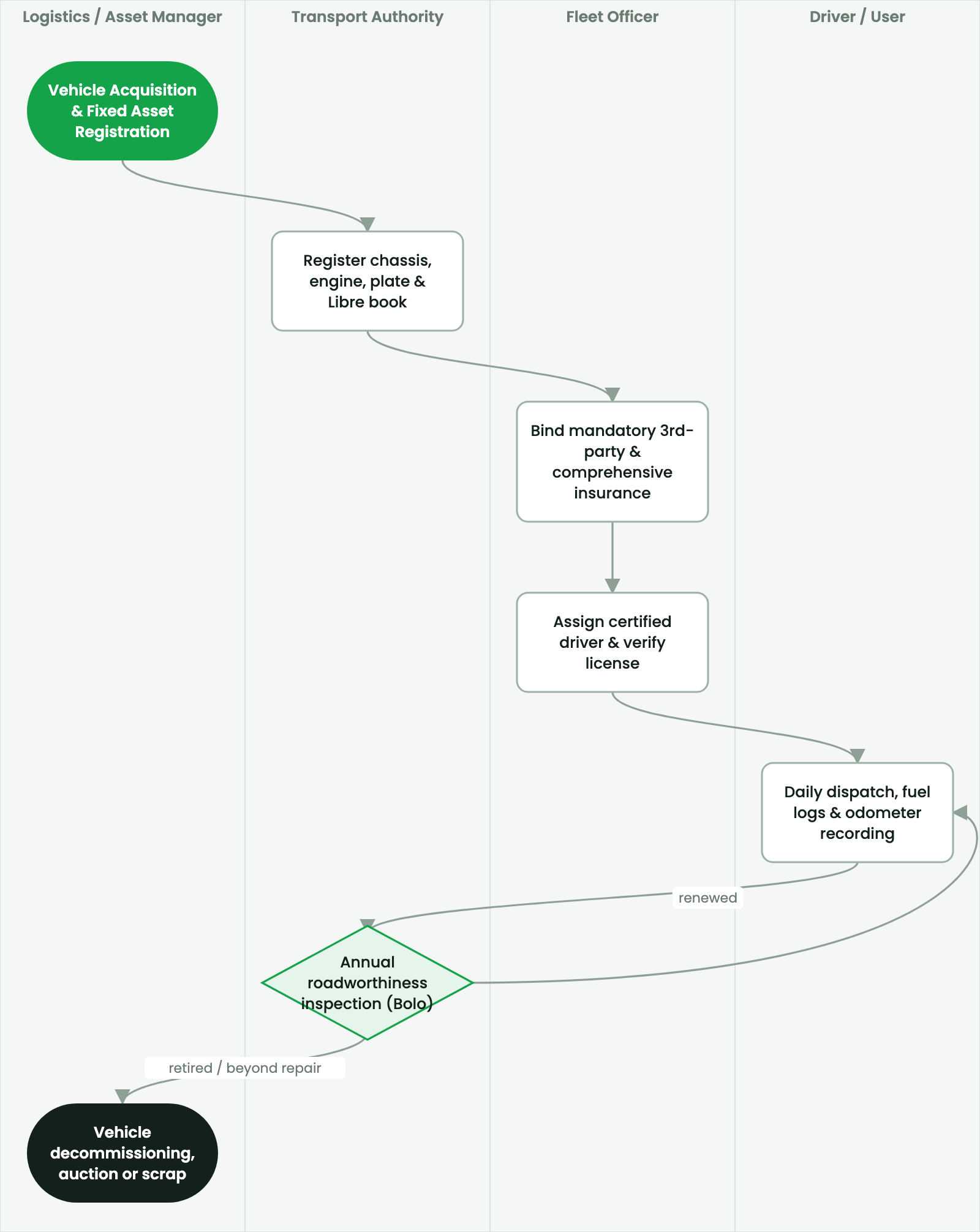
Resolving odometer rollback errors, duplicate fuel records, orphan service logs, data model schema, and ORM hooks.
2. Prerequisites & Security Access Groups#
- Required Modules:
fleet, smarterp_fleet_operations, smarterp_fleet_insurance - Security Groups:
Fleet Operator(Technical ID:fleet.group_fleet_user)Fleet Administrator / Transport Manager(Technical ID:fleet.group_fleet_manager)
- Master Data Dependencies: Vehicle asset cards, license plate registry, fuel cards, driver profiles, scheduled maintenance intervals, and third-party insurance policies.
3. Step-by-Step Configuration & Execution#
Step 1: Navigating to the Interface#
- Log into your SmartERP instance at
https://smarterp.et/odoo. - Open the main App Switcher (grid icon in the top-left corner).
- Navigate to Fleet → Vehicles.
Step 2: Operational Data Parameters & Controls#
Ensure all mandatory parameters comply with enterprise operational standards:
- Authorized Operator: Action executed under assigned RBAC permissions (Fleet Manager, Dispatch Officer, Maintenance Supervisor).
- Relational Integrity: Linked to upstream master records, approval requests, or transactional ledgers.
- Statutory & Quality Controls: Verified against Ethiopian statutory regulations and corporate governance standards.
Step 3: Operational Execution & State Progression#
- State Progression Gate: Advance record from Draft through Audited to Confirmed / Certified.
- Integrated System Impact: Automatically updates real-time operational states and posts financial/inventory journal moves.
- Audit Verification: System registers tamper-evident audit records logging user ID, timestamp, and cryptographic transaction digests.
Relational Data Model#
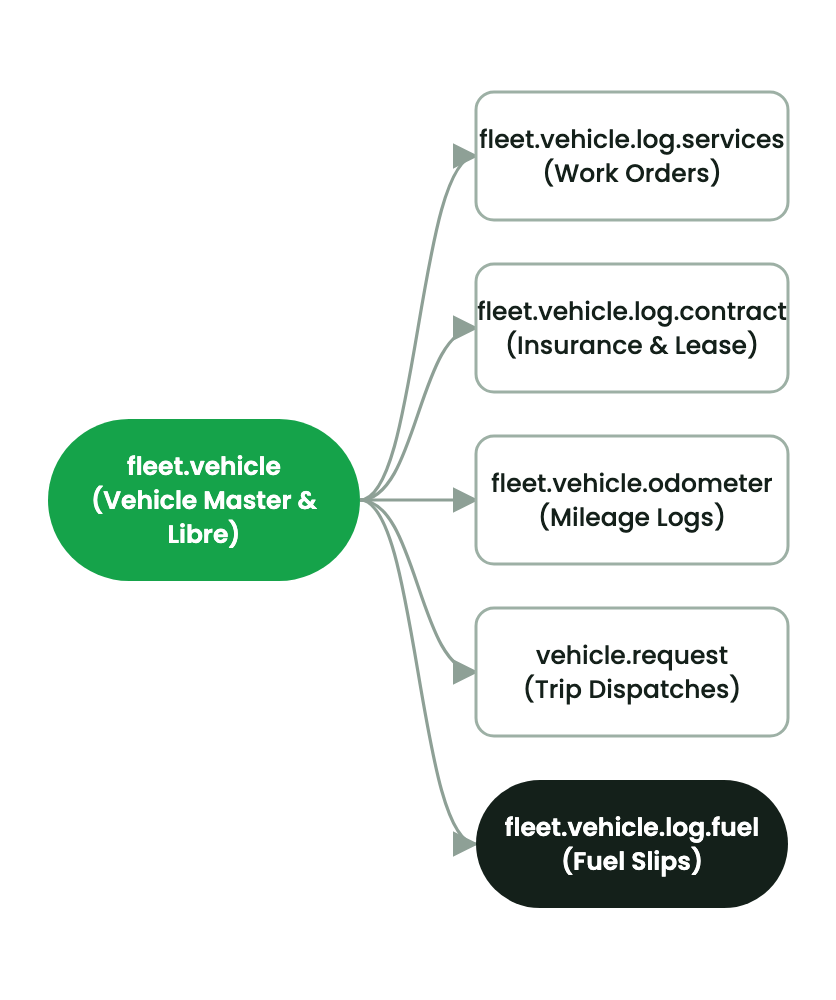
SmartERP Fleet is built upon a normalized relational schema tracking vehicles, service histories, odometer time series, and insurance contracts.
Core Python Models#
fleet.vehicle#
- Primary asset record storing license plate, chassis number, model, assigned driver, odometer cache, and state.
- Computes
_compute_count_all()for smart button counts (services, fuel logs, contracts, odometer).
fleet.vehicle.odometer#
- Chronological time-series log of distance readings. Enforces strict validation hooks preventing non-chronological rollback.
fleet.vehicle.log.services#
- Maintenance job cards tracking parts, labor, workshop assignment, approval state, and cost.
Issue: Odometer Entry Blocked with 'Cannot Log Value Lower Than Current'#
- Cause: A previous entry was mistakenly recorded with an extra zero (e.g.,
150,000 kminstead of15,000 km). - Solution: Fleet Administrators navigate to Fleet > Operations > Odometer, locate the erroneous historical entry, correct the numeric value, and click Save. The vehicle cache recalculates automatically.
4. Advanced Configuration Points#
- Automated Actions & Scheduled Tasks (Crons):
Fleet: Trigger preventive maintenance intervals(fleet.ir_cron_service_interval): Runs daily to alert transport officers when vehicles approach service kilometer thresholdsInsurance: Alert expiring third-party liability policies(fleet.ir_cron_insurance_alert): Runs weekly to flag insurance policies expiring within 30 days
- Custom Print Templates & Reports:
- Vehicle Preventive Maintenance Work Order
- Fleet Fuel Consumption & Mileage Analysis (km/L)
- Third-Party Liability & Comprehensive Insurance Schedule
- Driver Incident & Vehicle Lifecycle Cost Ledger
- Multi-Company Rules: Record-level security isolation under Company 1 (
Ashewa Technology Solutions S.C.), preventing cross-company ledger leakage across parent and subsidiary legal entities.
5. Comprehensive Troubleshooting Matrix#
| Error Symptom / Exception | Probable Root Cause | Corrective Action / Resolution |
|---|---|---|
Service Due Warning: Odometer exceeds threshold | Vehicle operating past scheduled oil change or brake inspection kilometer mark. | Ground vehicle and schedule immediate maintenance in Fleet → Services. |
Policy Expired Block: Vehicle grounded | Mandatory statutory third-party liability insurance has elapsed. | Renew insurance policy with underwriter and update expiration date on vehicle card before release. |
Fuel Anomaly Warning: Consumption exceeds normal rate | Logged fuel volume exceeds vehicle fuel tank capacity or normal kilometer ratio. | Audit driver logbook, inspect fuel card receipts, and perform fuel tank sensor diagnostic. |
Last updated: 2026-11-15