Roles and permissions
Human resources security groups, delegated permissions, field-level wage encryption, and approval authorities.
1. Overview & Business Value#
This comprehensive operational guide details the architecture, business workflows, configuration parameters, and execution steps for Roles and permissions within SmartERP.
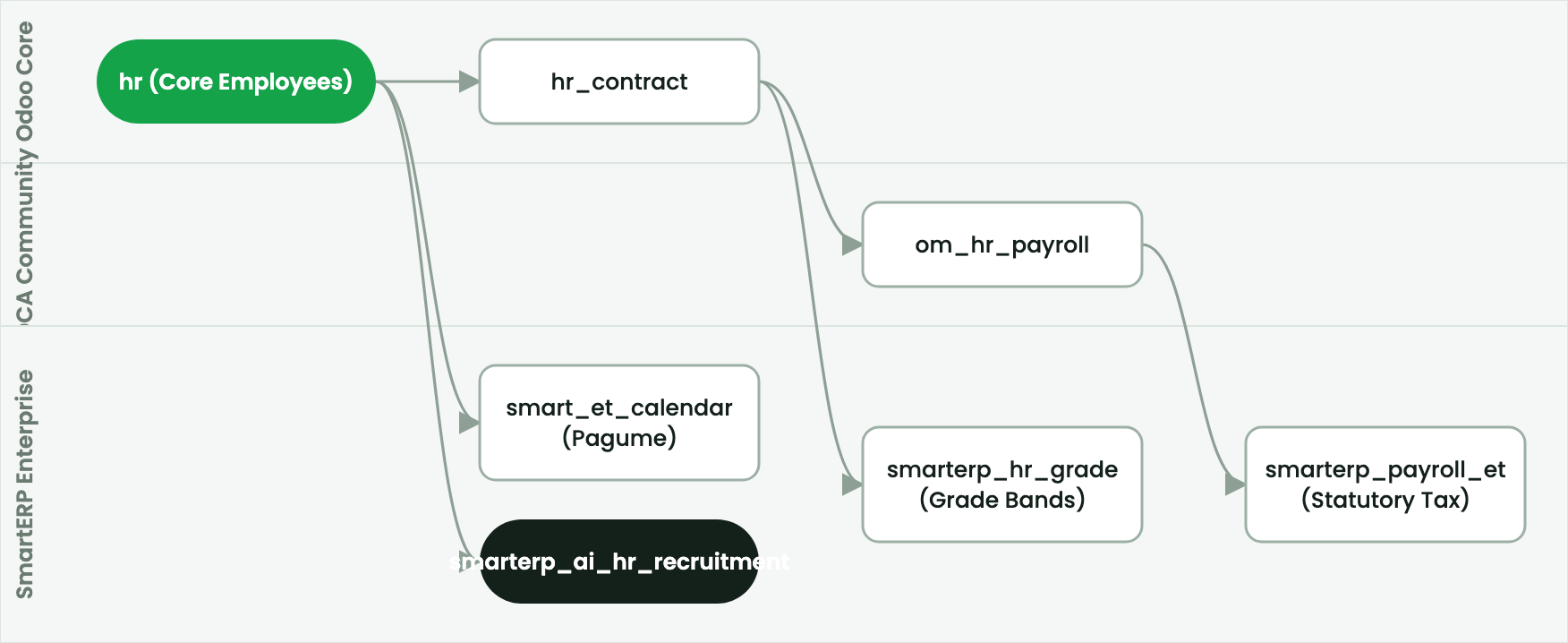
This page provides the security role reference for SmartERP HR & Payroll.
2. Prerequisites & Security Access Groups#
- Required Modules:
hr, hr_payroll, hr_holidays, smarterp_ethiopian_payroll - Security Groups:
Officer: Manage all employees(Technical ID:hr.group_hr_user)Payroll Officer(Technical ID:hr_payroll.group_hr_payroll_user)HR Administrator(Technical ID:hr.group_hr_manager)
- Master Data Dependencies: Company departments, job positions, salary structures, 7-tier Ethiopian income tax brackets, POESSA/PSSPA pension rates, and employee contracts.
3. Step-by-Step Configuration & Execution#
Step 1: Navigating to the Interface#
- Log into your SmartERP instance at
https://smarterp.et/odoo. - Open the main App Switcher (grid icon in the top-left corner).
- Navigate to Settings → Users & Companies → Groups.
Step 2: Workforce Data Parameters & Statutory Controls#
Ensure all personnel and compensation records adhere to statutory labor regulations:
- Designated Authority / Role: Operation authorized under verified RBAC role (Security Officer, Internal Compliance Auditor).
- Employee Master & Contract Binding: Linked to active employee profile, verified TIN, and active employment contract.
- Statutory Labor & Pension Validation: Compliant with Ethiopian Labour Proclamation No. 1156/2019, POESSA Pension Proclamation No. 1268/2022 (11% employer / 7% employee), and Income Tax Proclamation No. 979/2016.
Step 3: Operational Execution & State Progression#
- State Progression Gate: Advance record from Draft through Reviewed to Confirmed / Certified.
- Integrated Workforce Impact: Synchronizes attendance hours, adjusts leave entitlement balances, and feeds gross-to-net payroll journal disbursements (
account.move). - Audit Verification: System registers tamper-evident audit records logging user ID, timestamp, and cryptographic transaction digests.
Security groups matrix#
| Security Group | Technical Identifier | Operational Scope | Delegated Authorities |
|---|---|---|---|
| Employee (Self-Service) | base.group_user | Personal Profile | View own profile, download own payslips, submit leave. |
| Attendance Officer | hr_attendance.group_hr_attendance_user | Attendance & Biometrics | Manage biometric device sync, edit punch logs. |
| HR Officer | hr.group_hr_user | Personnel Admin | Create employee dossiers, manage contracts, allocate leave. |
| Payroll Officer | om_hr_payroll.group_hr_payroll_user | Payroll Engine | Compute payslips, generate batches, export bank transfer files. |
| HR Director / Manager | hr.group_hr_manager | Full HR Governance | Approve promotions, approve salary batches, configure rules. |
Sensitive data encryption and isolation#
- Wage Isolation: Basic wage and salary rules are encrypted and invisible to regular HR officers lacking
group_hr_payroll_userpermissions. - Multi-Company Security: Employee profiles and payroll batches are partitioned by
company_id.
4. Advanced Configuration Points#
- Automated Actions & Scheduled Tasks (Crons):
HR: Compute scheduled leave accruals(hr_holidays.ir_cron_leave_accruals): Runs bi-weekly to accrue annual leave balances per Ethiopian labor lawPayroll: Auto-generate monthly payslip batches(hr_payroll.ir_cron_generate_payslips): Runs on the 25th of each calendar monthAttendance: Validate biometric clock-in logs(hr_attendance.ir_cron_sync_attendance): Runs hourly to sync biometric terminal events
- Custom Print Templates & Reports:
- Official Ethiopian Monthly Payslip
- POESSA / PSSPA Statutory Pension Contribution Schedule
- MOR Employment Income Tax (PAYE) Monthly Summary
- Employee Service & Severance Certificate
- Multi-Company Rules: Record-level security isolation under Company 1 (
Ashewa Technology Solutions S.C.), preventing cross-company ledger leakage across parent and subsidiary legal entities.
5. Comprehensive Troubleshooting Matrix#
| Error Symptom / Exception | Probable Root Cause | Corrective Action / Resolution |
|---|---|---|
Access Rights Error: Employee private data hidden | User lacks HR Officer security clearance. | Assign the user to hr.group_hr_user under Settings → Users & Companies. |
Computation Error: Missing contract or salary structure | Employee has no active contract in 'running' state. | Confirm contract terms under Employees → Contracts and ensure contract status is 'Running'. |
Validation Error: Leave allocation exhausted | Requested time off exceeds accrued balance under Ethiopian Labor Proclamation 1156/2019. | Review historical attendance and submit a formal allocation adjustment request. |
Payroll Blocked: Unlinked TIN or Pension number | Statutory rule requires mandatory tax and pension coordinates for payslip calculation. | Update the statutory tab on the employee profile with valid MOR and POESSA registration details. |
Next#
- Configuration: Configuration and settings.
- Integrations: Integrations and APIs.
Last updated: 2026-11-15