Education AI Copilot & Student Advising Engine
Leverage embedded AI to assist professors with syllabus design, predict student dropout risk, and provide automated academic advising.
1. Overview & Business Value#
This comprehensive operational guide details the architecture, business workflows, configuration parameters, and execution steps for Education AI Copilot & Student Advising Engine within SmartERP.
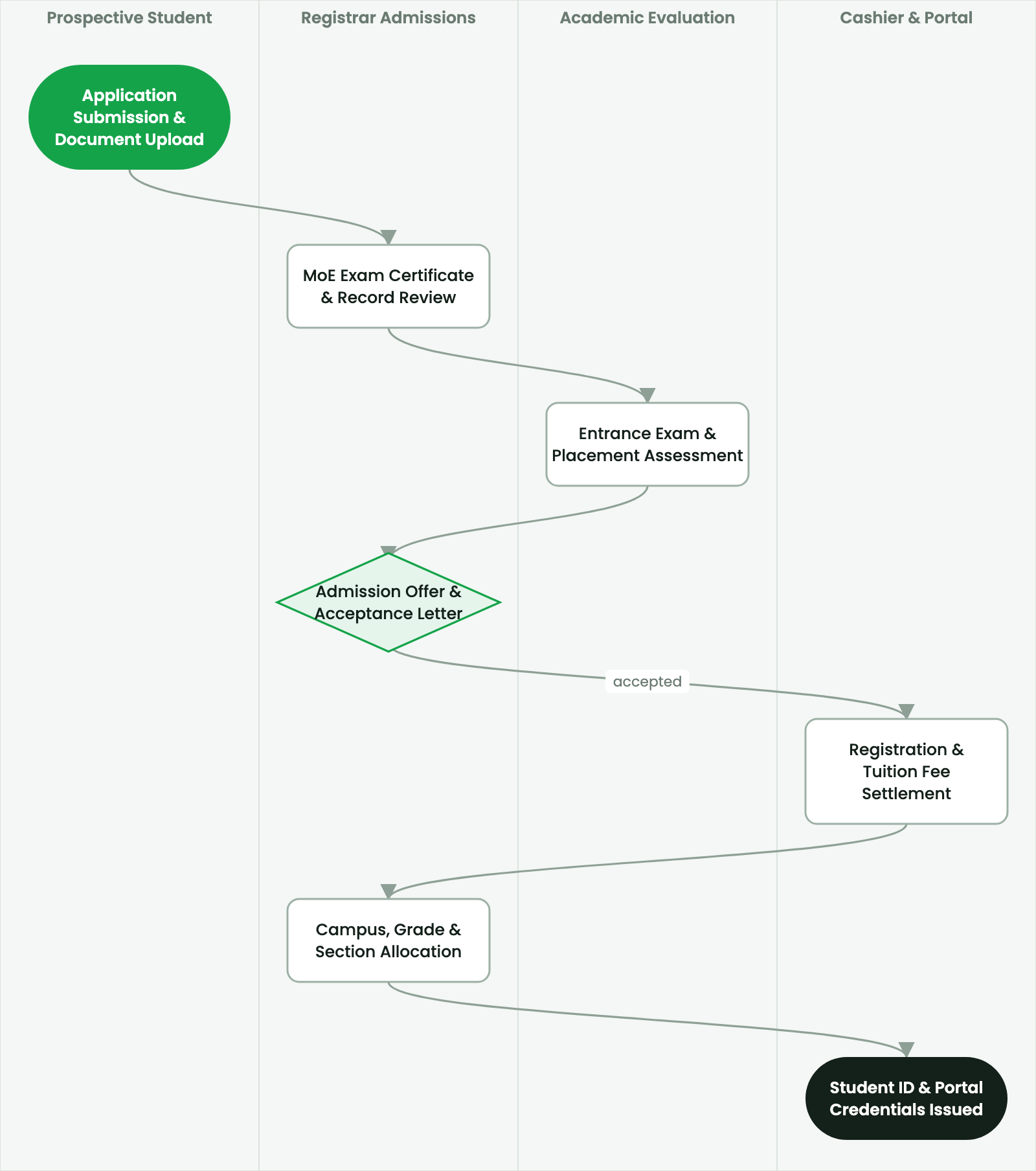
Leverage embedded AI to assist professors with syllabus design, predict student dropout risk, and provide automated academic advising.
2. Prerequisites & Security Access Groups#
- Required Modules:
smarterp_higher_education, smarterp_student_records - Security Groups:
Admissions Officer(Technical ID:smarterp_higher_ed.group_admissions_user)Registrar / Academic Dean(Technical ID:smarterp_higher_ed.group_registrar_manager)Faculty Member / Instructor(Technical ID:smarterp_higher_ed.group_faculty_user)
- Master Data Dependencies: Faculties, departments, ECTS modular curricula, academic semesters (Ethiopian/Gregorian calendar), tuition fee schedules, and student master files.
3. Step-by-Step Configuration & Execution#
Step 1: Navigating to the Interface#
- Log into your SmartERP instance at
https://smarterp.et/odoo. - Open the main App Switcher (grid icon in the top-left corner).
- Navigate to Academic → Students → Admissions.
Step 2: Operational Data Parameters & Controls#
Ensure all mandatory parameters comply with enterprise operational standards:
- Authorized Operator: Action executed under assigned RBAC permissions (Academic Registrar, Faculty Dean, Student Affairs Officer).
- Relational Integrity: Linked to upstream master records, approval requests, or transactional ledgers.
- Statutory & Quality Controls: Verified against Ethiopian statutory regulations and corporate governance standards.
Step 3: Operational Execution & State Progression#
- State Progression Gate: Advance record from Draft through Audited to Confirmed / Certified.
- Integrated System Impact: Automatically updates real-time operational states and posts financial/inventory journal moves.
- Audit Verification: System registers tamper-evident audit records logging user ID, timestamp, and cryptographic transaction digests.
Artificial Intelligence in University Operations#
The SmartERP Education AI Copilot provides intelligent decision support for faculty members, academic advisors, and institutional leaders, utilizing privacy-preserving, local enterprise LLM inference models.
Predictive Student Dropout & Academic Risk Modeling#
The AI engine analyzes longitudinal student performance patterns to identify at-risk students before final failure occurs:
- Continuous assessment score trajectories (e.g., dropping 20% between assignment and midterm).
- Attendance drop-off patterns (e.g., missed 3 consecutive lectures).
- Portal activity velocity and assignment submission timestamps.
When risk indicators cross warning thresholds:
- The AI Copilot flags the student on the Department Academic Advisor Dashboard with a High Risk badge.
- It generates actionable recommendations: "Student Dawit Bekele is struggling in Data Structures. Recommended intervention: Peer tutoring in pointers and recursion, and counseling on study load."
- The advisor schedules a targeted mentoring session directly from the alert interface.
AI-Assisted Syllabus & Course Material Generation#
Instructors can accelerate curriculum preparation:
- On the course creation canvas, click AI Syllabus Assistant.
- Input course parameters (e.g., "16-week undergraduate course in Machine Learning and Deep Learning for Computer Science, 4 ECTS").
- The AI Copilot:
- Suggests weekly lecture topics aligned with IEEE/ACM computing curriculum guidelines.
- Proposes laboratory practical assignments and real-world datasets.
- Formulates recommended reading lists and standardized assessment rubrics.
- The instructor reviews, edits, and finalizes the syllabus with full academic freedom.
4. Advanced Configuration Points#
- Automated Actions & Scheduled Tasks (Crons):
Education: Compute semester GPA and cumulative CGPA(smarterp_higher_ed.ir_cron_cgpa_calc): Runs at the end of each examination period to compute student academic standingFinance: Generate semester tuition fee invoices(smarterp_higher_ed.ir_cron_tuition_invoices): Runs prior to semester registration deadline
- Custom Print Templates & Reports:
- Official Student Academic Transcript (MoE & ETA Standards)
- Semester Course Registration & Clearance Slip
- Student ID Card with Cryptographic QR Verification
- Examination Results & Faculty Grade Distribution Ledger
- Multi-Company Rules: Record-level security isolation under Company 1 (
Ashewa Technology Solutions S.C.), preventing cross-company ledger leakage across parent and subsidiary legal entities.
5. Comprehensive Troubleshooting Matrix#
| Error Symptom / Exception | Probable Root Cause | Corrective Action / Resolution |
|---|---|---|
Prerequisite Blocked: Missing course prerequisite | Student has not successfully passed the prerequisite course code. | Register the student for prerequisite course or submit an academic dean prerequisite waiver. |
Grading Window Closed: Semester deadline passed | Faculty grade submission period has officially concluded. | Request temporary grade submission reopening from the Academic Registrar. |
Financial Hold: Outstanding tuition balance | Student examination entry or portal access blocked due to unpaid tuition invoice. | Process fee payment via Telebirr or record bank deposit voucher in the Finance office. |