ይህ ገጽ ገና ወደ አማርኛ አልተተረጎመም። የእንግሊዝኛው ጽሑፍ ቀርቧል።
Field Office Petty Cash & Revolving Funds
Manage remote humanitarian field office petty cash imprests, mobile cash advances, expense vouchers, and monthly reconciliations.
1. Overview & Business Value#
This comprehensive operational guide details the architecture, business workflows, configuration parameters, and execution steps for Field Office Petty Cash & Revolving Funds within SmartERP.
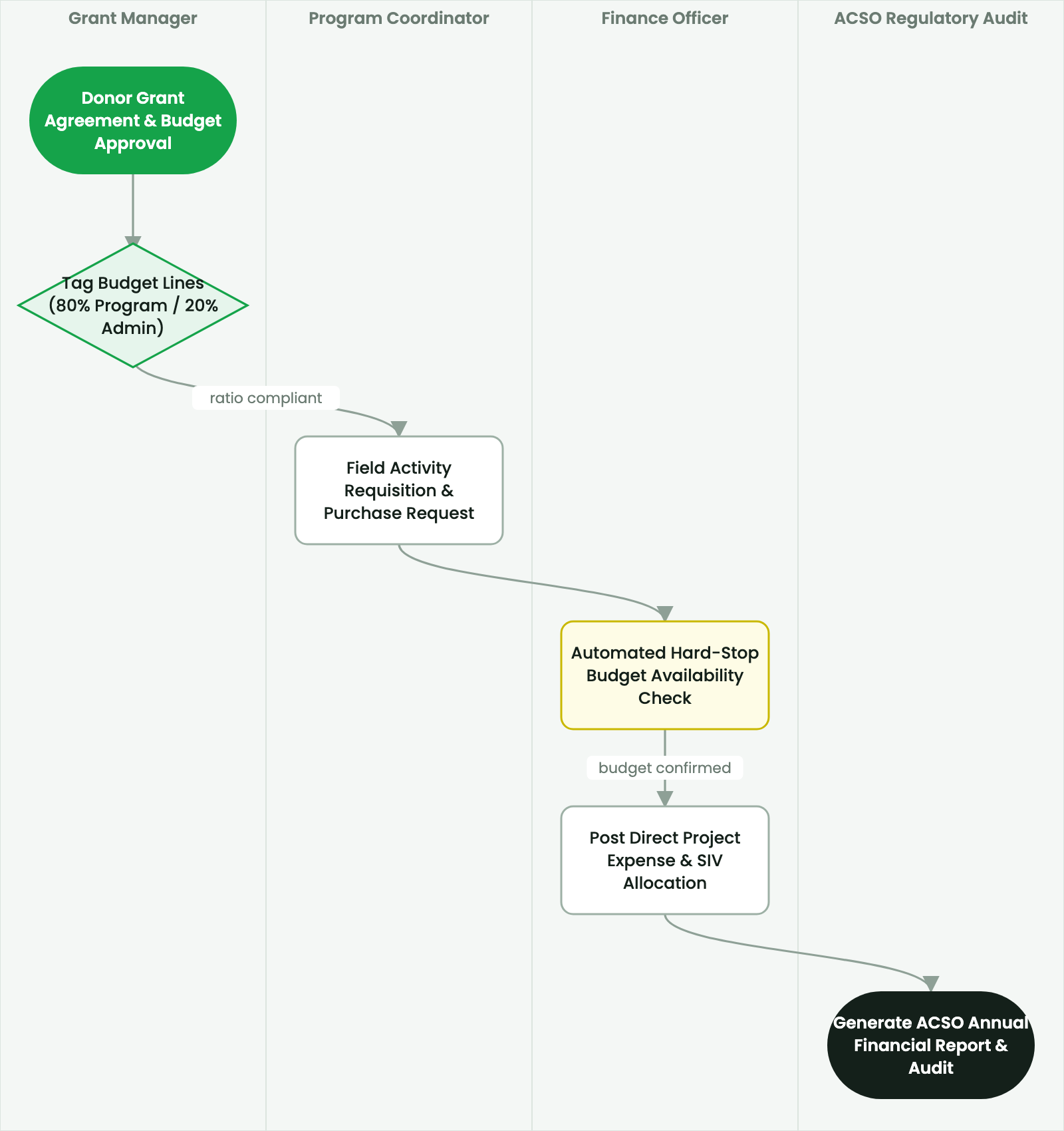
Manage remote humanitarian field office petty cash imprests, mobile cash advances, expense vouchers, and monthly reconciliations.
2. Prerequisites & Security Access Groups#
- Required Modules:
smarterp_ngo_grants, smarterp_humanitarian, smarterp_fund_accounting - Security Groups:
Grant Officer(Technical ID:smarterp_ngo.group_grant_user)Finance Director (NGO)(Technical ID:smarterp_ngo.group_grant_manager)Field Relief Distribution Officer(Technical ID:smarterp_ngo.group_field_officer)
- Master Data Dependencies: Donor profiles (USAID, EU, UN, FCDO), multi-currency grant agreements, restricted fund accounts, ACSO 80/20 cost allocation categories, and beneficiary rosters.
3. Step-by-Step Configuration & Execution#
Step 1: Navigating to the Interface#
- Log into your SmartERP instance at
https://smarterp.et/odoo. - Open the main App Switcher (grid icon in the top-left corner).
- Navigate to Grants → Active Grants.
Step 2: Operational Data Parameters & Controls#
Ensure all mandatory parameters comply with enterprise operational standards:
- Authorized Operator: Action executed under assigned RBAC permissions (Country Director, Grant Manager, Compliance Officer, M&E Specialist).
- Relational Integrity: Linked to upstream master records, approval requests, or transactional ledgers.
- Statutory & Quality Controls: Verified against Ethiopian statutory regulations and corporate governance standards.
Step 3: Operational Execution & State Progression#
- State Progression Gate: Advance record from Draft through Audited to Confirmed / Certified.
- Integrated System Impact: Automatically updates real-time operational states and posts financial/inventory journal moves.
- Audit Verification: System registers tamper-evident audit records logging user ID, timestamp, and cryptographic transaction digests.
Field Office Imprest Float Management#
Remote field offices (e.g., Dolo Ado, Shire, Assosa, Semera) require local liquid cash floats to pay casual labor, emergency truck repairs, and camp supplies:
- Open Accounting > Cash & Bank > Petty Cash Registers.
- Establish a Fixed Imprest Float (e.g.,
100,000.00 ETB). - Field cashier disburses funds against signed Petty Cash Vouchers (maximum threshold:
5,000.00 ETB / voucher). - Every voucher mandates:
- Purpose of expenditure, linked project and budget line, supporting physical receipt, and approving Field Office Coordinator signature.
Imprest Replenishment & General Ledger Audit#
When petty cash reserves drop below 30% of float:
- Field cashier submits an electronic Imprest Replenishment Request.
- Central finance in Addis Ababa reviews scanned voucher proofs.
- Upon approval, central treasury dispatches replenishment via bank transfer or Telebirr corporate wallet, restoring the imprest float to exactly 100,000 ETB.
4. Advanced Configuration Points#
- Automated Actions & Scheduled Tasks (Crons):
NGO: Calculate ACSO 80/20 cost ratio compliance(smarterp_ngo.ir_cron_acso_ratio): Runs weekly to flag any operational overhead drift above 20% limitGrants: Reconcile foreign currency funding variance(smarterp_ngo.ir_cron_fx_reconcile): Runs monthly to revalue restricted foreign currency bank accounts
- Custom Print Templates & Reports:
- ACSO Statutory Annual Financial Statement (80/20 Rule)
- Donor Financial Expenditure Report (Multi-Currency)
- Beneficiary Relief Distribution Voucher (Model 20 SIV)
- Time-and-Effort Personnel Timesheet Allocation Summary
- Multi-Company Rules: Record-level security isolation under Company 1 (
Ashewa Technology Solutions S.C.), preventing cross-company ledger leakage across parent and subsidiary legal entities.
5. Comprehensive Troubleshooting Matrix#
| Error Symptom / Exception | Probable Root Cause | Corrective Action / Resolution |
|---|---|---|
ACSO 80/20 Violation Block: Administrative overhead exceeds 20% | Cumulative overhead costs exceed statutory ceiling established under Proclamation No. 1113/2019. | Reclassify direct project support expenses to program operational accounts or restrict general administrative spending. |
Budget Burn Halt: Grant line item allocation exhausted | Committed purchase or payroll expense exceeds approved donor line envelope. | Submit a formal grant budget reallocation or amendment request to the donor. |
Duplicate Beneficiary Error: ID already claimed in cycle | National ID or biometric record already logged for current distribution cycle. | Audit beneficiary registration records and confirm identity against Kebele verification list. |
መጨረሻ የተሻሻለው: 2026-11-15